Run Your HVAC Business from First Call to Renewal
HVAC field service management software that handles the summer rush, midnight emergency calls, and PM contract renewals — so you can focus on growing your business instead of chasing paperwork.
Free for up to 5 users · 14-day trial on paid plans · Setup takes under 5 minutes
Built for HVAC companies
Running an HVAC Company Shouldn't Be This Hard
If any of these sound familiar, you don't need more people. You need one app that carries each call from booking to invoice and on to the next maintenance visit.
The Summer Rush Buries You
June hits and your phone rings nonstop. You're double-booking techs, losing track of who's where, and watching jobs slip through the cracks.
With FSM Navigator®:
See every tech's schedule on a board that refreshes through the day. Auto-assign based on location, skills, and availability. No more sticky notes or spreadsheets.
Emergency Calls Blow Up Your Schedule
A restaurant cooler goes down at 2 PM. Now you're reshuffling the entire afternoon, calling techs mid-drive, and hoping nothing else breaks.
With FSM Navigator®:
Flag urgent jobs with priority levels. See which tech is closest and least loaded. Reassign in 30 seconds instead of 20 minutes of phone tag (see the HVAC benchmark).
PM Contracts Fall Through the Cracks
You sold 40 HVAC maintenance agreements last winter. Now half are overdue because nobody tracked the schedule. That's recurring revenue walking out the door.
With FSM Navigator®:
Set up recurring jobs that auto-generate on schedule. Get alerts before they're due. Schedule the PM visit — and invoice it from the job. On the Pro and Enterprise plans, coverage terms, renewals and what each visit bills live on the service agreement itself.
One App from First Call to Renewals
Most HVAC shops juggle a booking line, a quoting spreadsheet, a dispatch board, an invoicing app and a binder of maintenance contracts. FSM Navigator is one app for all of it, whether you run 2 trucks or 200 techs, with no user limit on paid plans.
- Get the customer. Homeowners book a tune-up or a diagnostic from your online booking page, and each request waits for your approval. After the visit, every customer is asked for a rating, and everyone who rates can leave you a Google review. (Pro and Enterprise)
- Win the work. Price your repairs, labor and equipment once in the pricebook, then send a replacement quote with good, better and best options. The homeowner e-signs it on their phone and pays the deposit online, and the signed quote becomes a job at the agreed price and tax. (Pro and Enterprise)
- Do the work. Intelligent dispatch sends the tech with the right skills and certifications and keeps adjusting when a no-cool call lands at 2 PM (auto-assignment on Pro and Enterprise). When a NATE or other certification expires, that tech stops qualifying for those jobs (EPA 608 doesn't expire, so it needs no date), with reminders 30 days out, 7 days out and on the day. Job forms capture the tune-up checklist, and the customer signs on the tech's phone before they leave (Pro and Enterprise). The iOS and Android app works offline on every plan.
- Get paid. Invoice from the finished job on every plan. On Pro and Enterprise, customers pay by card or bank transfer (ACH) in their portal, a paid deposit is credited to the invoice automatically, and invoices sync to QuickBooks Online.
- Keep the customer. Maintenance agreements with a service address schedule their own tune-up visits, and membership plans give members their pricing and can charge the card on file automatically (Pro and Enterprise). On Enterprise, an agreement can cover specific units, and the renewal carries those units forward.
- Run the business. Job profitability shows the margin on every completed job against labor, parts and mileage (Pro and Enterprise), with a closer look at HVAC job costing. Inventory, assets and work orders are on Enterprise.
To follow each stage step by step, read how FSM Navigator works, and see how service agreements work for maintenance agreements.
HVAC Scheduling Software That Actually Works
Free HVAC scheduling software that replaces gut-feel dispatching. See who's available, who's closest, and who has the right skills — then assign in one click.
Intelligent Scheduling
See your entire week on one screen. Assign jobs to the right tech based on skills, location, and availability. The schedule refreshes on its own through the day.
Intelligent Auto-Assignment
New job comes in? FSM Navigator® matches it to the best available tech based on location, certifications, and current workload. You approve or let it ride.
SLA Tracking with Timers
Commercial contracts with 4-hour response times? Set SLA timers per customer or job type. Get alerts before you miss a deadline — not after.
Emergency Dispatch
Mark a job as urgent and the assigned tech gets an instant push notification. No more phone calls interrupting other jobs.
HVAC Online Booking for Tune-Ups and Estimates
Homeowners can request a tune-up, a diagnostic or a replacement estimate from your booking page, in an arrival window you set, while no-heat and no-cool calls still ring through on the call-now path. Every request waits for your approval, then becomes a scheduled visit in the same tool. Online booking is included on the Pro and Enterprise plans.
HVAC Invoicing Software That Gets You Paid Faster
Your techs finish the job. The invoice is ready to send before they leave the driveway. No more chasing payments weeks later.
Invoice from the Job Site
Generate invoices directly from completed jobs. Parts, labor, and flat-rate items are already filled in. One tap to send.
QuickBooks Sync
Invoices, customers, and payments flow to QuickBooks automatically. Your bookkeeper stays happy, and you stop entering data twice.
Customer Portal Payments
Customers view invoices and pay online through their own portal. No more "the check is in the mail" — payments hit your account in days, not weeks.
Faster Cash Flow
Same-day invoicing means same-week payments. HVAC companies using FSM Navigator® report getting paid an average of 15 days faster.
Average HVAC company gets paid 15 days faster with FSM Navigator®
On Pro, customers, invoices and payments go from FSM Navigator to your books through the QuickBooks Online integration. See how it works for HVAC software with QuickBooks Online.
An HVAC Mobile App Your Techs Will Actually Use
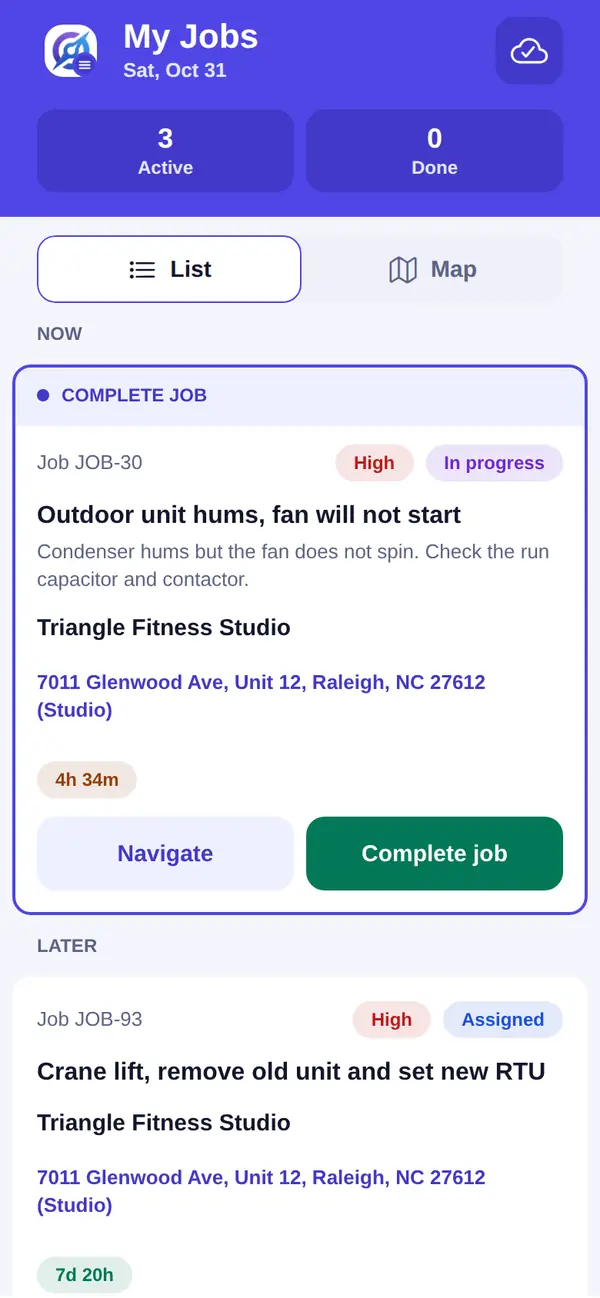
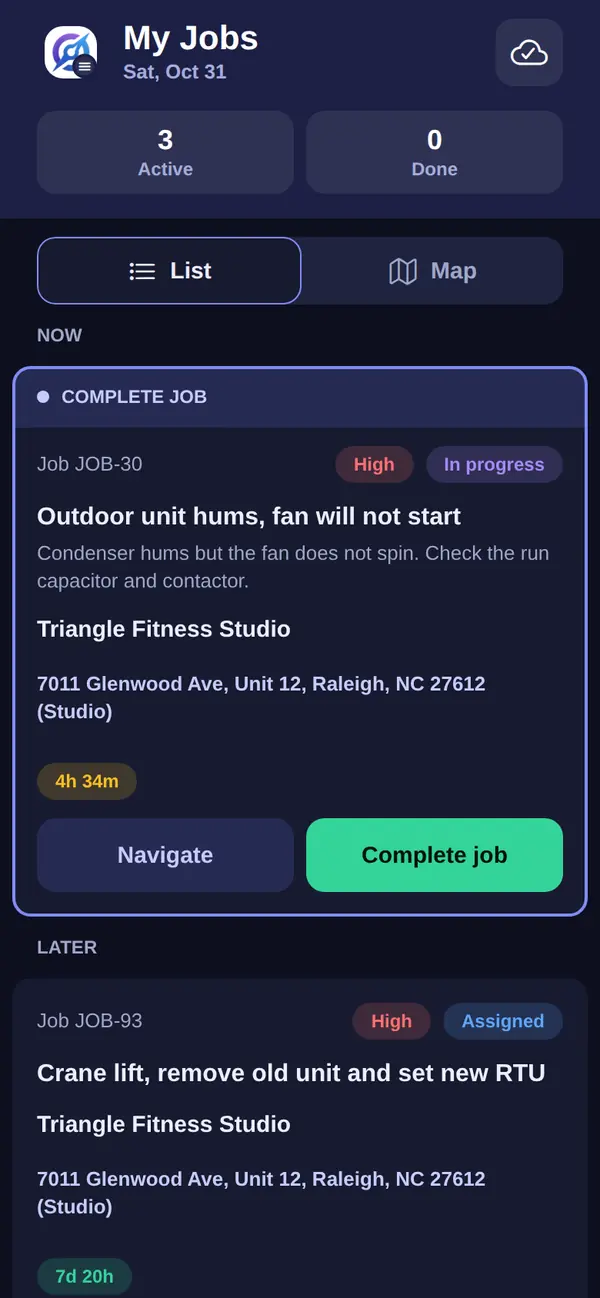
Built for attics, basements, and rooftops — places where cell signal is a luxury. Your techs get everything they need, even offline.
Offline-First Mobile App Every plan
View job details and log notes (plus take photos on Pro) — no signal required. Everything syncs when connectivity returns.
Photo Documentation Pro
Snap before-and-after photos of equipment, damaged parts, or model/serial tags. They attach to the job record automatically.
Full Asset Service History
Every past visit, note, photo, and part used — right on the tech's phone. No calling the office to ask "what did we do last time?" Warranty end dates sit on the same record; see HVAC equipment warranty tracking.
Digital Work Orders
Kill the carbon-copy forms. Complete HVAC work order management on every tech's phone — digital work orders with timestamps and automatic office sync.
Automatic Mileage Tracking Pro
HVAC techs drive a lot between service calls. Mileage tracking turns every dispatch into an automatic, IRS-ready record — captured from En Route to Arrived, ready for tax deductions at year-end.
Track Every Part, Every Refrigerant Cylinder, Every Van
Know exactly what's on each truck and in your warehouse. Stop losing money to mystery parts and surprise stockouts.
Van Stock Tracking
Know exactly which parts and how much refrigerant are on each service van, updated as techs use inventory.
Barcode Scanning
Scan parts with your phone camera. No dedicated hardware needed. Counts update as parts are used.
Low-Stock Alerts
Set minimum thresholds per part. Get notified before your tech shows up to a job with an empty van. Reorder before it's a problem.
Refrigerant Tracking
Log the refrigerant used on each job as an inventory item, so purchase and usage history is ready when you prepare your EPA Section 608 records. It all stays in one place — no more scrambling through filing cabinets.
Why HVAC Companies Choose FSM Navigator
Built for the way HVAC businesses actually work — not the way software companies wish you did.
Free for up to 5 users
Up to 5 users at $0/month — forever. Paid plans include a 14-day free trial. Real scheduling and dispatch for real HVAC companies.
Up and Running in Minutes
No mandatory onboarding calls, no multi-week "implementation." Sign up, add your techs, start dispatching. Setup takes under 5 minutes.
No Contracts, Cancel Online Anytime
Month-to-month billing. No annual lock-ins, no hidden fees, no setup charges. You stay because it works, not because you're trapped. Access continues to the end of your paid period.
Works Offline — Really Every plan
Your techs work in attics and mechanical rooms where cell signal doesn't reach. Our mobile app works fully offline and syncs when they're back in range.
HVAC Inventory on Every Van Enterprise
Track refrigerant, filters, parts, and fittings per van. Barcode scanning, low-stock alerts, and automatic usage logging. No more return trips to the warehouse.
Transparent, Simple Pricing
Free for up to 5 users. Pro at $34.99/user/month. Enterprise at $59.99/user/month. That's it — transparent pricing, no surprise charges, no hidden add-ons.
Why HVAC Teams Choose FSM Navigator
Dispatch Smarter, Not Harder Pro
Skills-based auto-assignment evaluates skills and certifications, availability and working hours. The right tech gets the right call without playing phone tag. See which HVAC certifications expire.
Invoice Before You Leave the Driveway
Techs close jobs and send invoices from the field. No more chasing paper job sheets at the end of the week. Your cash flow improves because billing happens the same day the work gets done.
Easy Enough for Every Tech
Set up in minutes, not days. Built for field techs who want to work, not wrestle with software. Clean mobile interface, no training manual required.
Common Questions from HVAC Companies
What's the best field service software for HVAC companies?
Look for HVAC software that runs the whole job, not just the schedule. FSM Navigator fits HVAC companies from 2 technicians to 200 and beyond, and there is no user limit on paid plans. It covers online booking, quotes, intelligent dispatch, invoicing and maintenance agreements, starts at $0/month for up to 5 users, and adds inventory tracking on the Enterprise plan. It is useful on day one, with no weeks of training or five-figure onboarding.
How much does HVAC service management software cost?
FSM Navigator's Free plan covers up to 5 users with full scheduling, dispatch, and basic invoicing — forever. Pro ($34.99/user/month) and Enterprise ($59.99/user/month) both include a 14-day free trial. No contracts, no setup fees, cancel online anytime; access continues to the end of your paid period.
Does FSM Navigator work for both residential and commercial HVAC?
Yes. Whether you run residential service calls, commercial PM contracts, or new construction installs, FSM Navigator handles all of it. You can set SLA timers per customer or per job, give every job a priority level, and adjust the labor rate on each invoice. Many users manage mixed residential and commercial work from a single account without any friction.
Is there a free HVAC scheduling app?
FSM Navigator's Free plan includes full HVAC scheduling and dispatch for up to 5 users, with no trial expiration. You get a schedule board that updates automatically, mobile app for your techs, push notifications for job updates, and basic invoicing. It's not a stripped-down demo — it's a real tool that small HVAC shops run their businesses on every day.
Can I track refrigerant usage for EPA recordkeeping?
Yes. With the Enterprise plan's inventory module, you stock refrigerant as an inventory item and log what's used on each job, in whole units. Purchases and per-job usage stay in one place, so the history is there when you prepare your EPA Section 608 records. Low-stock alerts help you reorder before your techs run out.
Does it integrate with QuickBooks?
Yes. The Pro plan includes a direct QuickBooks Online integration. Turn on automatic sync and invoices, customers, and payments flow over every 15 minutes — your bookkeeper stops dealing with manual data entry and your books stay current. The connection takes about 2 minutes: you sign in to QuickBooks and approve it.
How long does setup take?
Setup takes under 5 minutes. Sign up, add your techs and their skill areas (install, service, PM), and start scheduling. There's no mandatory onboarding call, no implementation project, and no waiting period. If you run into questions, our support team is here to help — but most people don't need to ask.
What happens if an HVAC technician calls in sick?
FSM Navigator automatically detects when a technician becomes unavailable and reassigns their active jobs to the next best available technician based on skills, location, and workload. Zero manual intervention required.
Does FSM Navigator track mileage for HVAC techs?
Yes. HVAC techs drive a lot between service calls, and mileage tracking captures those miles automatically. When a tech marks a job En Route, tracking starts; it stops on Arrived — so every dispatch becomes a logged, IRS-ready record at the IRS standard rate by default (76 cents per mile since July 1, 2026) or your own rate. At year-end you have contemporaneous, GPS-based records ready for tax deductions, with no manual logbook. It's included on the Pro and Enterprise plans.
Built for Every Trade
More Reading for HVAC Operators
Mileage deductions, the hiring squeeze, and what the whiteboard is quietly costing you every week.
Mileage Tracking for an HVAC Business
The IRS rules on business mileage, and how to capture every trip without asking a single tech to write anything down.
Read the articleSolving the Technician Shortage Without Hiring
Where HVAC operators find real capacity inside the crew they already have when there is nobody good left to hire.
Read the articleThe Hidden Cost of Manual Dispatch
A five-minute model for what the whiteboard costs you in drive time, overtime, and no-heat calls you never got to.
Read the articleHow to Build a Flat Rate Price Book
Pick the 20 jobs that pay the bills, cost them properly, and price to a margin, not a markup.
Read the articleYour techs fix the furnace and get asked about the dryer? See field service management for appliance repair.
Before the first cold snap, read our no-heat call triage playbook.
Your Techs Are Ready. Your Customers Are Waiting.
Join the HVAC companies that stopped drowning in phone calls and started growing. Free for up to 5 users — set up in minutes, not months.
Free forever for up to 5 users — No credit card required