Service Agreement Software
You sold the coverage once. Stop re-deciding it on every job. FSM Navigator® holds each maintenance agreement and membership — what it covers, how fast you promised to respond, what it costs — books the visits it includes and applies it to the work.
14-day free trial · Nothing charged until the trial ends · Cancel anytime
What Is Service Agreement Software?
It is the difference between an agreement that exists on paper and one that actually changes how a job is handled.
Most contractors sell coverage long before they have a system for it. The agreement lives in a folder, the terms live in someone's head, and every invoice becomes a small negotiation: was this call covered? Did we promise four hours or next day? Is this the customer who is on the parts-only plan?
Service agreement software turns that folder into a record the rest of the system reads. The agreement knows which customer, site or equipment it reaches. It knows what it waives. It knows the response you committed to. When a job comes in under it, those facts are already attached — nobody has to remember them, and nobody has to be right about them under pressure.
The payoff is not paperwork. It is that the revenue you already sold stops leaking through jobs that were billed when they should have been covered, and through agreements that quietly ran out while you kept turning up.
Maintenance Agreement Software — Every Contract in One Place
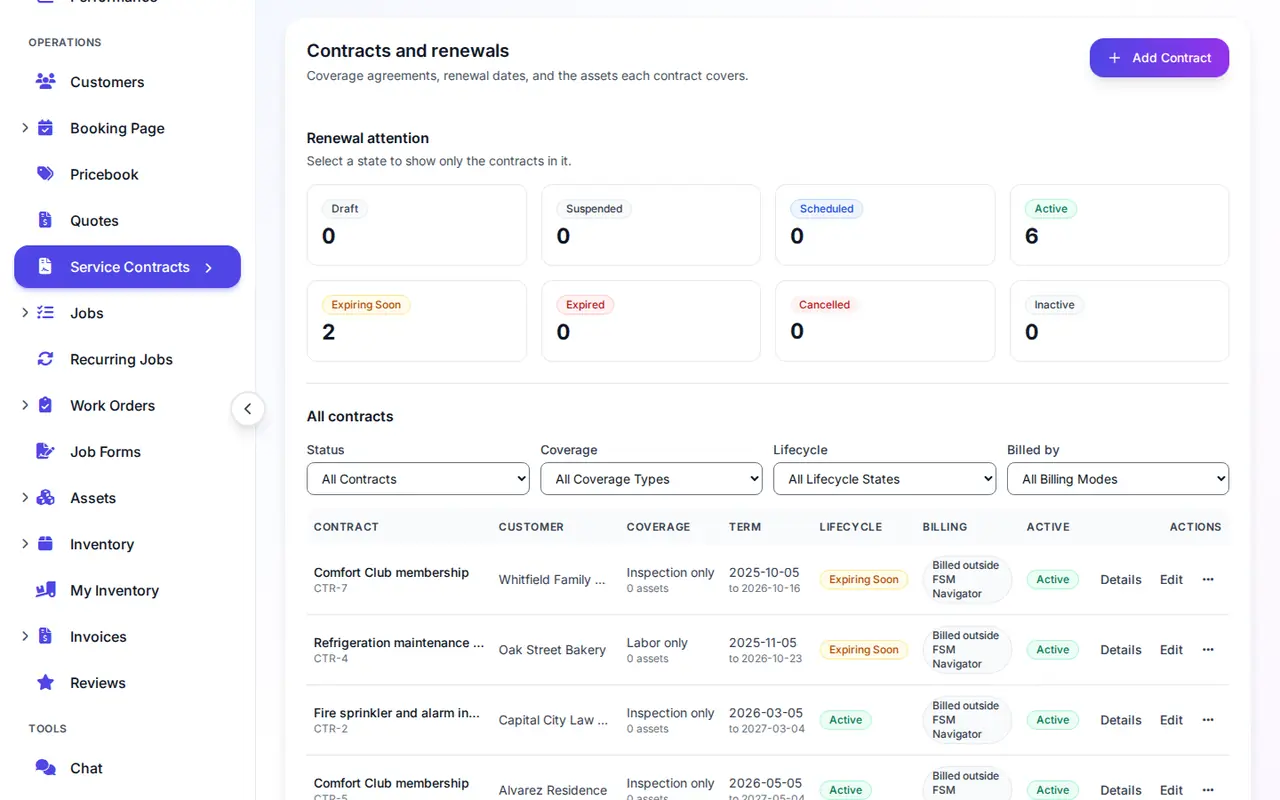
Every agreement you hold, what it covers, when it ends. Not one row per machine — one record per arrangement, however many machines it spans.
One Record Per Agreement
Name it, date it, attach the equipment. An agreement spanning forty units is one record, not forty. It is issued its own contract number on save, and that number never changes.
Three Widths, Narrowest Wins
Write an agreement against a piece of equipment, a single site, or the whole customer. A job follows the narrowest one that reaches it, so a blanket plan and a richer plan for one building coexist without unpicking either.
Two Views, Same Records
See every agreement you hold from one screen when you are reviewing the book, or one customer's agreements and their signed paperwork from the customer record when they call.
Coverage — Exactly What the Agreement Includes
No two agreements are sold on the same terms, so the software does not decide for you. You tick what the agreement waives, and everything you leave unticked is billed as normal.
You Choose the Covered Set
Labor, parts, permits, inspection lines, travel, everything else — six item types, each its own tick box. A plan that covers labor but charges for parts is two clicks. A plan that covers nothing but buys a four-hour response is a valid thing to sell, and the form tells you that is what you built.
Applied at Invoice Time, Confirmed by You
Raise the invoice and FSM Navigator® finds the governing agreement, pre-ticks coverage and names the agreement beside the box. A covered line keeps its real hours and quantities and drops to zero charge, so the paperwork still shows the work. Untick it when the job was genuinely out of scope.
The system fills in the answer; it never overrides you. Out-of-scope work and goodwill calls are real, and the person raising the invoice knows the job better than a rule does. What you get is a default that is right most of the time and a note telling you which agreement produced it.
Contract-Driven SLAs
A gold-tier customer gets someone on site in four hours. Everyone else gets next business day. That promise belongs on the agreement, not in a dispatcher's memory.
Response and Resolution Hours
Record what you committed to, in hours, on the agreement. An agreement with the times written down looks different from one you never agreed times on — and that difference matters the first time a customer quotes their contract back at you.
Agreements That Book Their Own Visits
A maintenance plan earns its keep when the spring tune-up actually happens. Turn one-off jobs into recurring revenue without a spreadsheet of who is due.
Visits That Schedule Themselves
Give an agreement a service location and a visit schedule, say two tune-ups a year, and FSM Navigator® creates each visit while the agreement is in force. When it ends, the visits stop. When it renews, the schedule moves to the new term and picks back up.
Membership Plans With Member Pricing
Build a plan once, such as a "Comfort Club" with two visits a year and 15% off repairs, and sell it in a few clicks. Members get their discount on labor and parts automatically, on invoices and on quotes. If your office also gives a discount, the larger one wins; they are never stacked.
Automatic Card Payments
Collect a card when you sell the plan and each billing period is charged to it. A declined card is retried, the customer is asked for a new one when it can't be used, and they can still pay the invoice from their customer portal.
Sell It Where the Customer Is
Your office sells plans from the agreements screen, your techs sell them from the job in the mobile app, and you can let customers buy a plan themselves in the customer portal. How agreement plans work.
Contract Renewal Tracking, Before It Lapses
An agreement that runs out unnoticed is a customer you stop being paid by and keep serving. That is the quietest way a service business loses money.
A Lead Time Per Agreement
Thirty days by default, and yours to change on each one. A large annual account might want ninety days so there is room to negotiate; a small one might only need a fortnight.
A Daily Digest, Announced Once
Agreements coming up for renewal reach the people who own the book, by email and by Telegram if you use it. Each agreement is announced once — not re-mailed every morning until you cave and mute it.
Renew, Carrying the Equipment
Renewing creates the next agreement with its covered equipment already ticked, and links it back to the one it replaced. Two terms, one continuous relationship, and a history you can still read in three years.
Pay by Card or Bank Transfer
A commercial customer settling a large agreement invoice should not have to put it on a credit card.
Both Options on the Payment Page
Invoices paid through the customer portal offer card and US bank transfer side by side. The customer picks; you do not have to field a phone call about it or chase a cheque you were never told was coming.
Or Say It Is Billed Elsewhere
Plenty of agreements are paid on a standing order or through your accountant. Mark the agreement that way and the customer's portal tells them where it is billed, rather than leaving them wondering why no invoice appeared. Coverage still applies to their jobs either way.
Service Contract Management Software for Growing Teams
Agreements are not a module off to one side. They touch the equipment you track, jobs you dispatch, invoices you raise and what your customer sees.
Asset Maintenance
Preventive schedules on the equipment an agreement covers.
Asset Management
The equipment register an agreement is attached to.
Asset Lifecycle
What happens to a machine after the coverage ends.
Scheduling
Where a contract response time turns into a booked visit.
Customer Portal
Where the customer pays and sees where an agreement is billed.
Mobile App
The technician arriving at the covered equipment.
Work Orders
Multi-visit projects that run under an agreement.
Estimates
Quoting the work an agreement does not cover.
Built for How Your Trade Sells Coverage
HVAC Maintenance Agreements
Seasonal plans, rooftop units under their own terms, and renewals that have to land before the cooling season starts.
HVAC service agreementsFire Protection Inspection Agreements
Recurring inspection coverage across a portfolio of buildings, where the deficiencies you find are the work an agreement does not cover.
Inspection agreementsAgreement, Contract or Membership?
The words get used interchangeably and mostly that is fine. Where the difference actually bites, and which one to put on your paperwork.
Read the comparisonService Agreement Software Questions
What is service agreement software?
Service agreement software stores the arrangements you sold your customers — what each one covers, how fast you promised to respond, what it costs and when it ends — and applies them to the work automatically. Instead of a dispatcher remembering which customer is on which terms, the agreement travels with the job: coverage is worked out when you invoice, and the response commitment is attached to the call.
What is maintenance agreement software?
The same thing under a different name. Maintenance agreement, service agreement, service contract, maintenance contract and membership plan all describe an arrangement where a customer pays for ongoing coverage. FSM Navigator treats them as one record type, so it does not matter which word your business uses on the paperwork.
How do HVAC companies track maintenance contracts?
Write the agreement against a customer, a site or specific equipment, then attach the units it covers. Every job on that equipment is governed by it, so the technician is not guessing whether a rooftop unit is on the plan. Renewal reminders on a lead time you set per agreement stop a seasonal plan lapsing between the last visit and the next.
What should a service agreement include?
A coverage period, what it covers, what it costs, and how fast you respond. In FSM Navigator that means a start and end date, a tick list of the item types the agreement waives, a monthly or annual fee, and response and resolution times in hours.
Can one agreement cover a whole customer, or just one site?
Either, and both at once. An agreement is written at one of three widths — a piece of equipment, a single site, or the whole customer account — and a job is always governed by the narrowest one that reaches it. So a customer can hold a blanket agreement and a richer one for a single building, and the building gets its own terms without you unpicking the blanket.
Does coverage get applied automatically when I invoice?
It is worked out automatically and filled in for you, and you keep the final say. When you raise the invoice, FSM Navigator finds the agreement that governs the job, pre-ticks the coverage box and names the agreement beside it. A covered line keeps its real hours and quantities and drops to zero charge. You can untick it to bill work the agreement does not really cover.
What happens when a service agreement expires?
It stops governing jobs on the day after its end date. Coverage is no longer applied from it, its response times stop applying, and the record stays on file with every invoice it affected untouched. Before that happens you get a renewal reminder, on a lead time you set per agreement, so the lapse is never a surprise. Renewing creates the next agreement linked to the one it replaced, with its covered equipment still attached and its visit schedule carried over to the new term.
Can customers pay by bank transfer instead of card?
Yes. Invoices paid through the customer portal offer both card and US bank transfer, so a commercial customer settling a large agreement invoice does not have to put it on a credit card. The payment page shows both options and the customer picks.
Which plans include service agreements?
Service agreements are included on the Pro and Enterprise plans. On Pro you can write agreements against a customer account or a single site, sell labor-only or inspection-only coverage, and bill the agreement fee. Membership plans, member pricing, automatic card payments and agreements that schedule their own visits are on Pro too. Agreements tied to individual equipment need asset management, and coverage that includes parts needs inventory, so those two are part of the Enterprise plan.
Service Agreements Guide (Docs) How Service Agreements Work (Docs)
More on Service Agreements
The deadlines an agreement commits you to, the system it has to live in, and how to tell a demo from the real product.
SLA Tracking for Field Service Teams
A 30-day rollout plan for the response and resolution hours an agreement puts you on the hook for.
Read the article FundamentalsWhat Is Field Service Management?
A plain-English guide to the system an agreement has to live inside — the customers, equipment and visits it governs.
Read the article EvaluationSix Questions That Separate the Demo From the Product
What to ask before you commit, including how coverage actually reaches a job and what the invoice does with it.
Read the articleReady to Make Your Agreements Do Something?
Put the coverage you sold where the work happens. Set up your first agreement in a few minutes and see it applied on the next job you invoice.
14-day free trial on all paid plans · No commitment required · Service agreements are included on Pro and Enterprise