One Price List. Every Quote and Booking Page Uses It.
Put your services, labor and materials in one place. Your online booking page shows them, and your quotes pull from them. Change a price once, and every new quote and booking page visitor sees the new one.
Included in Pro and Enterprise · Inventory-linked material prices are on Enterprise
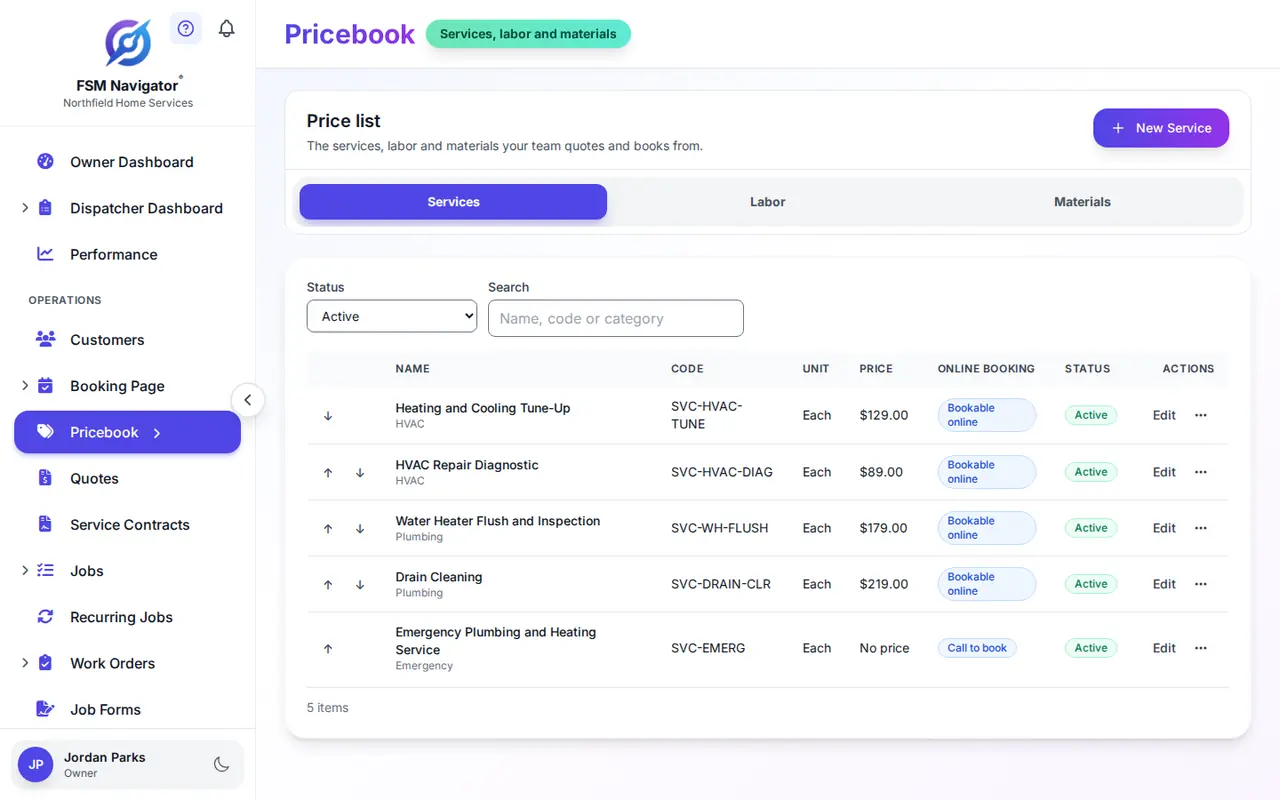
Four price lists, and none of them agree
The website says the tune-up starts at $89. The spreadsheet in the office says $99. Your newest tech charges $109, because that's what's on the laminated sheet in his truck from two years ago. The customer who booked online gets a bill $20 higher than she expected, and she's not wrong to be annoyed.
Nobody did anything wrong. You just have four price lists. Every time a price changes, someone has to remember to update all four, and nobody ever does.
A pricebook fixes this by being the only list. The booking page reads it, and quotes read it. You keep one thing current.
Services, Labor and Materials
Every item has a name, a category, a unit (each, hour, foot, gallon and so on), a price and a description. Leave the price blank for work with no fixed price.
Services
The jobs you sell by name: "AC tune-up", "Water heater flush", "Main line drain cleaning". Name them the way your customers talk, because that's what they'll read on the quote.
Labor
Hourly rates such as "Standard labor" and "After-hours labor", for the work you still bill by time. Flat-rate services and hourly labor sit side by side.
Materials
Parts and supplies, with a part number or SKU and the unit you sell them in. Codes are unique across the whole pricebook, so one SKU always means one item.
Retire an item without losing it: archive it, and restore it when you need it again.
Build the job once, with its parts included
A toilet replacement always uses a wax ring and a supply line. A water heater swap always uses a pan and a flex connector kit. Add those materials to the service once, with a quantity for each, and the pricebook shows the bundle total: the service's own price plus every material.
Put the service on a quote and its materials come with it as lines, so nothing gets left off. Up to 50 materials can go into one item. If one of them has no usable price, the bundle shows no total at all, rather than a total that quietly leaves something out.
Set the Price Once, Use It Everywhere
Your Booking Page
The services on your online booking page come from the pricebook. For each one, choose bookable online, call to book, or not offered online, and show it as "from $X", "free estimate" or "quoted on site". Your labor items and materials never show up there.
Your Quotes
Building a quote means picking items, not typing them. The name, unit and price come with each line, and good, better and best options are built from the same items, so every quote for the same job carries the same numbers.
Member Prices
Give an item a member price. When a customer on one of your membership plans gets a quote, each line uses the member price or the plan's percent off, whichever saves them more. Customers without a plan see the list price.
Job Forms
Tie a job form or checklist to a pricebook service. When a booking request for that service becomes a job, the form comes with it, so the tech gets the right steps to fill in.
Part prices read from inventory
On Enterprise, link a pricebook material to an item in your inventory. It then takes its sale price, part number and unit from inventory, so there's one price to keep current instead of a copy that drifts. Change the price in inventory and the pricebook shows the new one.
The pricebook shows the sale price, not what you paid for the part. Your cost stays on the inventory side, where your existing inventory access rules still apply. Want the material to keep its own price instead? Unlink it and enter the price it should have from then on.
One Pricebook vs. the Way You Do It Today
| The way you do it today | With the FSM Navigator pricebook |
|---|---|
| A spreadsheet in the office, a sheet in each truck, prices on the website | One list in the app you already run the day from |
| Two techs, two prices for the same job | Every quote line comes from the same item |
| The booking page price drifts away from the quote | Both read the same pricebook |
| Retyping a five-part job on every quote | One service with its materials included |
| Part prices kept in two places | On Enterprise, a linked material reads its price from inventory |
Building Your First Pricebook?
Start with the 20 jobs you do most. That's enough to quote from next week. Add the long tail as it comes up.
Build a Flat Rate Price Book
Cost each job properly and price to a margin, not a markup, with a worked example.
Flat Rate vs. Time and Materials
Which jobs belong on a flat price, and which are fairer by the hour.
How to Charge for Travel Time
Trip fees, service-call fees and built-in travel, compared.
Pricebook Questions
Which plans include the pricebook?
Pro ($34.99 per user per month) and Enterprise ($59.99 per user per month). Linking a material to inventory, so its price is read from inventory, is Enterprise, because inventory is Enterprise.
Does it come with prices already filled in?
No. It is your price list, built from your costs and your market. There is no pre-built pricing. If you are starting from scratch, our step-by-step guide to building a flat rate price book walks through it.
Can I import prices from my supplier?
Not today. There is no supplier price import. On Enterprise, a material linked to inventory reads its price from inventory, so you keep one number up to date.
Will prices change on their own when my costs go up?
No. A pricebook price changes when you change it. The one exception is an Enterprise material linked to inventory, which follows the sale price you keep in inventory.
Can I use the pricebook if I bill by the hour?
Yes. Add labor items priced by the hour alongside your flat-rate services. Most shops run a mix.
What happens to quotes I already sent when I change a price?
Nothing. A sent quote is locked at the prices it went out with. New quotes and your booking page use the new price from then on.
Who can see and change prices?
Owners and managers can add, edit, bundle and archive items. Dispatchers and technicians can view items and prices but not change them. A linked material shows its inventory sale price, not what you paid for the part.
Does it work with my online booking page?
Yes. Each service can be bookable online, call to book, or not offered online, and its price can show as a "from" price, "free estimate" or "quoted on site". Labor items and materials never appear on the booking page.
Step-by-step setup is in the pricebook help guide.
Set Your Prices Once
Build your pricebook during your trial and quote from it the same week, in the one app you book, dispatch, invoice and renew from.
14-day free trial · Nothing charged until the trial ends · The pricebook is included on Pro and Enterprise