Every job done the same way. Signed before the truck leaves.
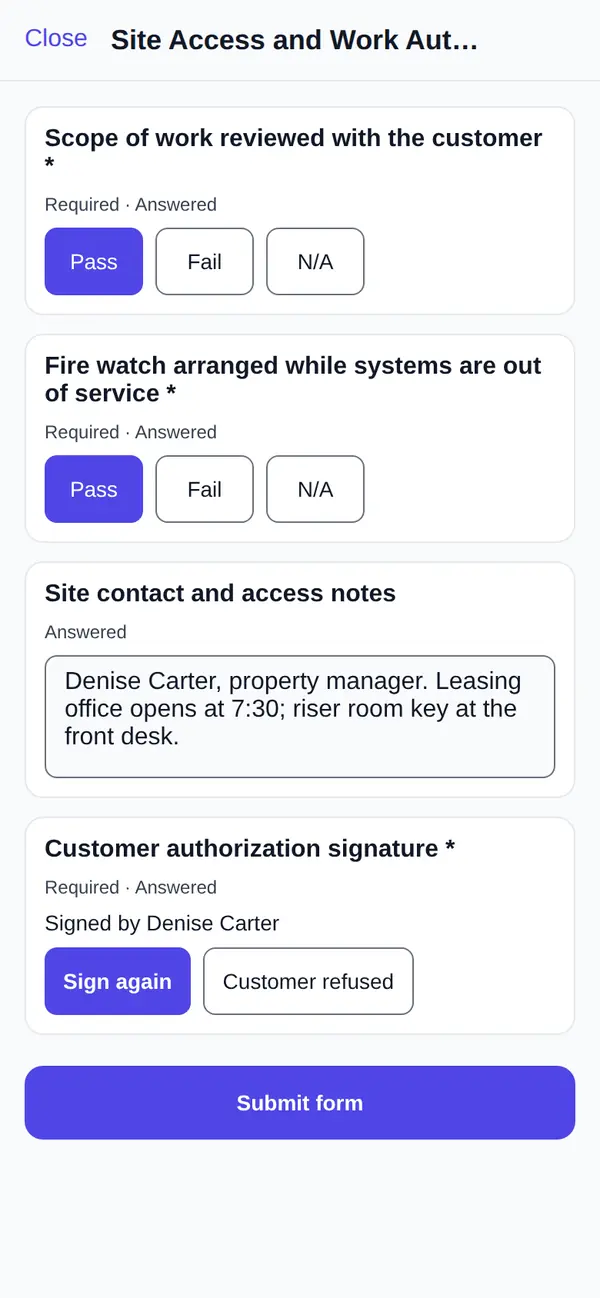
Job forms and customer signatures in FSM Navigator®, the one app that runs your service business from first booking to renewals. Your checklists attach to the job. Technicians work through them on their phone and can't close the job with a required form unfinished. The customer signs on the same phone, and if they won't, the tech records why.
Included in Pro and Enterprise · 14-day free trial · No setup fees
The checklist that only exists on paper
Your best tech runs the full inspection every time. Your newest tech runs most of it, when they're not behind. The carbon-copy sign-off gets filled in on the tailgate and left in the truck.
Then in March a customer calls to say nobody told them the extra part would cost more, and all you have on file is a smudged ticket.
Checklists and signatures only protect you if they're done on every job and kept where you can find them. Paper makes that hard. A separate form app makes it easy to skip, because the form lives in one place and the job in another.
Your Forms, Built From Your Steps
Owners and managers build forms on the Job Forms page. Write each item the way your team talks, pick its answer type and tick the items that have to be answered before the form can be submitted.
Pass, Fail or N/A
The backbone of any inspection: a yes-or-no check for every item your standard visit covers, with a not-applicable choice for the ones that don't.
Readings With a Range
Number items take an acceptable range and a unit. A static pressure or a temperature split outside the range is flagged when it's saved.
Text, Dates and Choices
Notes on what was found, the date a part was installed, or a pick from a list you write, like filter size or panel type.
Photos From the Job
A photo item asks for a picture the tech has taken on the job, so the before and after shots sit next to the check they prove.
Customer or Tech Signatures
Each signature item says who signs it: the customer, or the technician confirming their own work.
Edits Don't Rewrite History
A form on a job keeps the version it started with. Changing the form next month never changes what a customer signed last month.
Forms Attach Where They Belong
Nobody should have to remember which checklist goes with which job. Set a rule once, choose whether the form is required or optional, and new jobs pick it up.
By Job Type
Every new job of that type gets the form. Your standard sign-off or safety check goes on every job without anyone adding it.
By Pricebook Service
Link a form to a service in your pricebook. When you approve a service request for that service, the job it creates arrives with the right checklist.
By Work Order Template (Enterprise)
Jobs created from a work order template carry the forms bound to it, so a multi-visit project runs the same checks at every stage.
By Hand, on Any Job
Owners, managers and dispatchers can add a form to any job, and choose whether it has to be finished before the job can close.
On Enterprise, a preventive maintenance job generated from an asset's maintenance schedule arrives with that schedule's checklist attached as a required form.
Required means required
Mark a form required, and the job can't be marked complete until that form is submitted. The forms that are still open are listed, so the tech knows exactly what's left. The checklist stops being a suggestion on the ninth job of a long Friday.
Sometimes a job really does need to close without it. The customer cancelled halfway through, or the unit was inaccessible. An owner or manager can complete the job anyway, but they have to write a reason, and the override goes into the audit log with the forms that were missing. Technicians and dispatchers can't override. You'll see how often it happens and why, and a high override rate usually means the form needs fixing, not the techs.
A submitted form is locked. If something needs correcting, an owner, manager or dispatcher reopens it with a reason.
Customer signature app, built into the job
Turn on Require customer signature to complete, and FSM Navigator creates an editable Customer sign-off form and adds it as a required form to every new job. Word it the way you want your customers to read it.
At the end of the visit, the tech enters the signer's full name and hands over the phone. The customer sees the agreement sentence, then signs with a finger. Anyone who can't draw a signature can type their name instead.
When the customer won't sign. It happens. The homeowner left a key, the tenant can't approve work for the landlord, or the customer is unhappy with the bill. The tech taps Customer refused and writes the reason. That counts as an answer, so the job can close with an honest record instead of a blank line or a scribble. What to do when a customer refuses to sign.
Each signature records the signer's name, which is stored encrypted, the time our server received it and the agreement sentence the signer saw. The record is sealed, so a later change to it can be detected.
Built for Basements, Rooftops and Crawlspaces
Works Without Signal
In the iOS and Android app, answers, signatures, refusals and submitted forms save on the phone and sync when the connection comes back.
No Silent Overwrites
If someone in the office changed the same answer while the tech was offline, the tech is told about the conflict instead of one answer quietly replacing the other.
Only Their Own Jobs
Technicians see and fill in forms on the jobs assigned to them. The office can fill in a form on the tech's behalf from the job's Forms tab.
Proof that sits with the job, and goes out with the invoice
A signature tells you someone signed. It doesn't tell you what was done. That's why checklist, photos and signature all live on the same job record:
- The checklist shows what the tech checked and measured.
- The photos show what the site looked like.
- The signature, or the refusal reason, shows the customer saw it.
Submitted forms print on a signed-forms page of the job's invoice PDF, with every answer, each signature, the signer's name and when it was signed. Customers who use your customer portal see the same forms in their service history. When a question comes up months later, the answer is already on the invoice they received. Why a signature on its own isn't proof of service.
Built for inspection programs
Fire protection and solar teams run the same inspection steps hundreds of times a year. Build your inspection checklist as a form, attach it to every inspection job by job type, and make it required. The site contact signs off on the technician's phone.
The forms are yours. We don't supply code-specific or certified forms, so build them to match your inspection program and the standards you work to. Our fire inspection checklist and solar commissioning checklist are good starting points, and there's more on fire protection compliance tracking.
Forms and Sign-Off vs. the Way You Do It Today
| The way you do it today | With FSM Navigator job forms |
|---|---|
| Carbon-copy tickets in the truck. | Forms and signatures on the job, on the phone. |
| Checklists skipped when the day runs long. | Required forms block completion. |
| No record of why a step was skipped. | Overrides need a reason and go into the audit log. |
| A blank signature line. | A signature, or "customer refused" with a reason. |
| A form app that lives beside the job. | The form is part of the job and prints on its invoice. |
| Paperwork chased before invoicing. | The job doesn't close until it's done. |
Where Forms Fit, From First Booking to Renewals
- A customer requests a visit from your booking page, or signs a quote on their phone.
- You approve it, and the job arrives with the checklist for that service already attached.
- Intelligent dispatch sends the right tech, weighing skills, SLA deadlines, workload and availability, and keeps adjusting as the day changes.
- The tech works through the form, takes the photos and gets the signature before leaving.
- The invoice goes out with the signed forms attached, and the customer pays by card or bank transfer in the portal.
- On a service agreement, the next visit is already on the schedule.
Guides on Forms and Sign-Off
Why a Signature Isn't Proof of Service
What card disputes actually ask for, and what a job record that holds up looks like.
Job Completion Form Template
The fields that matter, the ones to leave off, and a copy-ready template.
When a Customer Refuses to Sign
What your techs should say, what to record, and what the office does next.
Mobile App
Where your techs fill in forms, take photos and collect signatures.
Work Orders
Multi-visit projects whose templates carry their own forms.
Job Forms Help Guide
Step by step: build a form, set attach rules and require a signature.
Job Forms Questions
Which plans include job forms and customer signatures?
Pro ($34.99 per user per month) and Enterprise ($59.99 per user per month). Attaching forms through work order templates and maintenance schedules needs Enterprise, because those features are Enterprise-only.
Can I use my own checklists?
Yes. You build your own forms from pass/fail checks, readings, text, dates, choices, photos and signatures. There is no form library, so you start from your own steps and the default customer sign-off form.
Can forms attach to jobs automatically?
Yes. Attach a form to every new job of a job type, to the job created when you approve a service request for a pricebook service, or, on Enterprise, to jobs created from a work order template. Each rule makes the form required or optional. Owners, managers and dispatchers can also add a form to any job by hand.
What if a technician can't finish a required form?
The job can't be marked complete until every required form is submitted. An owner or manager can complete it anyway with a written reason, and the override is recorded in the audit log. Technicians and dispatchers can't override.
Can I require a customer signature on every job?
Yes. Turn on "Require customer signature to complete" on the Job Forms page. FSM Navigator creates an editable Customer sign-off form the first time you turn it on and adds it, as a required form, to every new job.
What if the customer won't sign or isn't there?
The technician records that the signature wasn't collected and why. That counts as an answer, so the job can still be completed, and the reason shows on the invoice PDF and in the customer portal.
Do forms work without a signal?
Yes. In the mobile app, answers, signatures, refusals and submitted forms are saved on the phone and sync when the connection comes back. If someone in the office changed the same answer in the meantime, the technician is told about the conflict instead of it being overwritten.
Does the customer get a copy of what they signed?
Submitted forms, with their answers and signatures, print on a signed-forms page of the job's invoice PDF. Customers who use your customer portal also see them in their service history for completed jobs.
Where are signatures stored?
With the job. Each signature records the signer's name, which is stored encrypted, the time the server received it and the agreement sentence the signer saw. The record is sealed, so a later change to it can be detected.
Are your inspection forms NFPA-compliant?
We don't supply certified or code-specific forms. You build forms to match your own inspection program, and the standards you work to decide what has to be on them.
Is an electronic signature legally valid?
Federal law says a signature can't be denied legal effect just because it's electronic (15 U.S.C. 7001). Whether a particular sign-off settles a particular dispute depends on the facts and your state. That's a question for your attorney.
The federal E-SIGN Act is at 15 U.S.C. § 7001.
Put Your Checklist on Every Job This Week
Turn on the customer sign-off, edit the default form into your own, and attach your first checklist by job type.
14-day free trial · Nothing charged until the trial ends · Job forms are included on Pro and Enterprise