Field service software that sends your work to QuickBooks Online
Customers, invoices and payments you record in FSM Navigator are sent to your QuickBooks® Online company, so the office stops keying the same work twice.
Sign up free, then start a 14-day Pro or Enterprise trial from your account. A payment method is collected when the trial starts and isn't charged until the trial ends. Included in Pro and Enterprise.
The Friday afternoon reconciliation
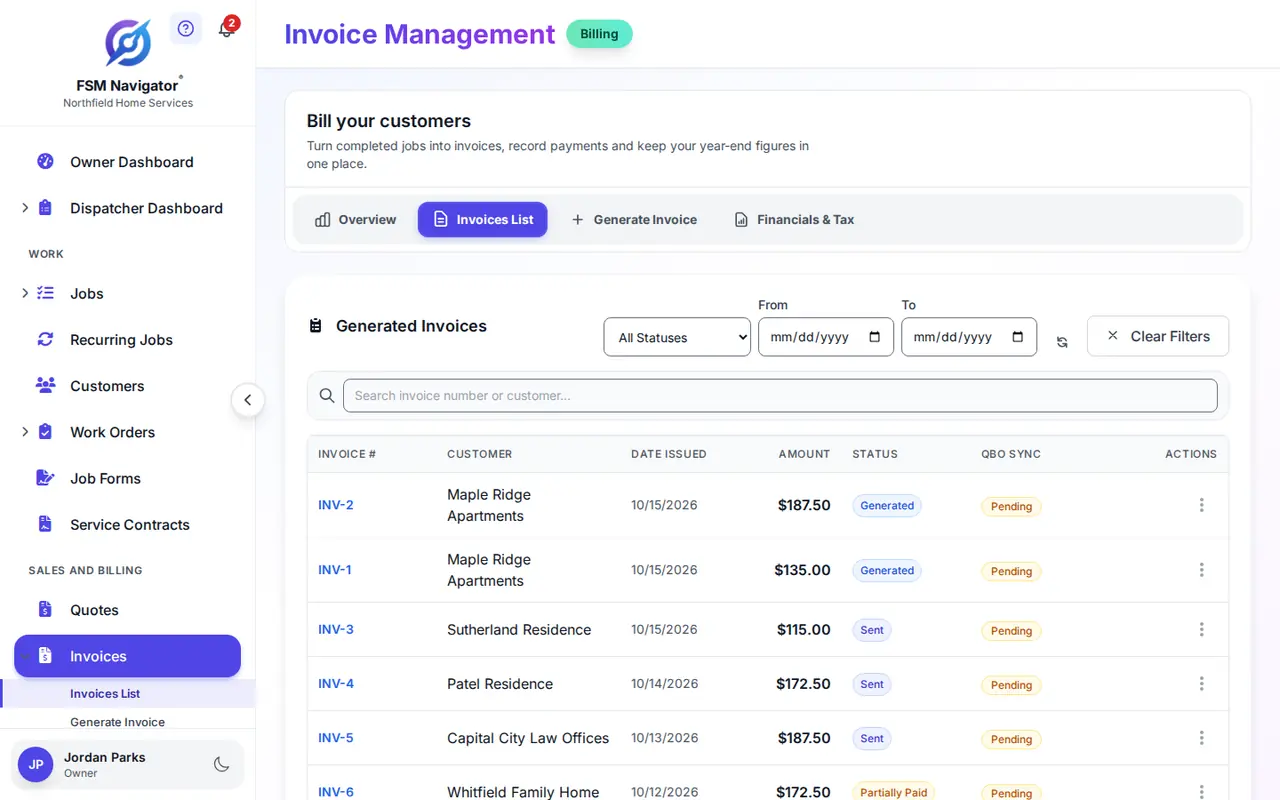
It's 3:40 on a Friday and your bookkeeper wants the week closed by Monday. Eleven invoices went out from the field this week, and each one has to be typed again into QuickBooks Online. Two customers paid by card, one mailed a check, and one paid twice because the reminder went out after the money landed.
That's the retyping a field service software QuickBooks integration should take off your desk. Not the accounting. The second set of entries, the payment postings and the customer records your bookkeeper rebuilds by hand.
The work happens in one place and the books live in another. An HVAC shop running maintenance visits all week doesn't have a bookkeeping problem. It has a copy-and-paste problem, and every copy is a chance to get a number wrong.
What FSM Navigator sends to QuickBooks Online
On Pro, FSM Navigator sends customers (with their service locations), invoices (including voids) and payments (including refunds) to QuickBooks Online. The sync runs one way, from FSM Navigator to QuickBooks Online.
Customers
Customers you add or update in FSM Navigator are sent to QuickBooks Online, and each service location goes over as a sub-customer under its customer. Make customer changes in FSM Navigator; changes made only in QuickBooks Online aren't copied back.
Invoices
The invoice you build from the job is the one sent to QuickBooks Online, and a voided invoice is voided there too. No second invoice typed from a printed copy, no transposed totals, no "which one is right" call with your bookkeeper.
Payments
Payments are sent too: card and bank payments customers make in the customer portal, and payments your office records by hand. Refunds and chargebacks go over as credit memos. A platform fee applies to online payments; see pricing.
Not sure what each type looks like in your books? The QuickBooks Online set-up guide walks through connecting your company and the choices you make along the way.
You decide when it syncs
Off until you turn it on
Automatic sync has a separate switch for customers, invoices and payments, and all three start off. Turn on only what you want sent without anyone clicking.
On a schedule you choose
When automatic sync is on, it runs as often as you set, from every 15 minutes to once a day.
Or one at a time
Send a single customer or invoice by hand, or use Sync All Pending to send everything waiting in the queue.
The Owner connects it
Only the Owner connects your QuickBooks Online company. Each FSM Navigator account connects to one QuickBooks Online company.
What changes for the office, and what doesn't
What changes: the retyping. Once you turn on automatic sync for customers, invoices and payments in the QuickBooks settings, they're sent to QuickBooks Online without a second round of data entry. There's less to catch up on at the end of the week.
What doesn't change: your bookkeeper's job. QuickBooks Online stays your accounting system. Your tax settings, your reports and your year-end stay where they are, with whoever runs them today. FSM Navigator reads your sales tax setting from QuickBooks Online and adds only what it needs to post your work, such as a service item and a Customer Deposits account if your company doesn't already have them.
Worth knowing before you connect. FSM Navigator is the starting point: customers, invoices and payments are created in FSM Navigator and sent to QuickBooks Online. Nothing is imported from QuickBooks Online, and an existing QuickBooks Online customer with the same name isn't matched. FSM Navigator creates its own record and labels it so the two stay distinct. Pricebook items and tax codes aren't sent either. Agree with your bookkeeper how to handle existing customers before you connect.
QuickBooks Desktop isn't supported. The integration connects to QuickBooks Online only.
Field service software that works with QuickBooks Online, without taking over your books
FSM Navigator is a field service management app, one app from first call to renewals. The customer books a visit, you send a quote, the work gets scheduled and done, and the invoice goes out from the job. That's a lot of records that would otherwise be rebuilt by hand in your accounting software.
If customer records are already a mess, fix that first. Our post on cleaning up duplicate customer records is a good place to start, and how to calculate profit per job shows what job-level numbers are for.
Where QuickBooks Online fits in FSM Navigator
Invoicing and payments
Invoice from the job on every plan, and on Pro let customers pay by card or ACH.
Customer records
Every customer and site, with jobs, invoices and history in one place.
Job profitability
The margin on every completed job, on Pro. QuickBooks Online keeps the company-wide view.
Set-up guide
Connecting your QuickBooks Online company, step by step.
All integrations
Every connection and the plan it needs.
Plans and pricing
What's on Free, Pro and Enterprise.
Questions Owners Ask About QuickBooks Online
What does the QuickBooks Online integration send?
Three things, from FSM Navigator to QuickBooks Online: customers, invoices and payments. Customers go with their service locations, invoices include voids, and payments include refunds, which arrive as credit memos. The sync runs one way, and automatic sync stays off until the Owner turns it on for each type. Your tax settings and reports stay in QuickBooks Online with whoever manages them today.
Which plans include the QuickBooks Online integration?
Pro and Enterprise. Free doesn't include it. Pricing is per user, and you can start a 14-day Pro trial from your account to connect your QuickBooks Online company and try it with your own customers and invoices. A payment method is collected when the trial starts and isn't charged until the trial ends.
Does FSM Navigator work with QuickBooks Desktop?
No. The integration connects to QuickBooks Online only. If your books are in QuickBooks Desktop today, talk with your bookkeeper or accountant about your setup first. Invoicing itself works in FSM Navigator on every plan, so you can still invoice from the job either way.
Do changes made in QuickBooks Online come back into FSM Navigator?
No. The sync is one way, from FSM Navigator to QuickBooks Online, and nothing is imported. If you edit a customer in QuickBooks Online, FSM Navigator doesn't see the change, and the next time FSM Navigator sends that customer its details replace the matching fields. Make customer changes in FSM Navigator.
Do payments from the customer portal show up in QuickBooks Online?
Yes, once automatic payment sync is turned on. On Pro, customers can pay invoices by card or bank transfer (ACH) in the customer portal, the money settles to your own Stripe account, and the payment is sent to QuickBooks Online so nobody keys it in a second time. A platform fee applies to online payments; see the pricing page.
Do I still need a bookkeeper if I use the integration?
Yes, if you have one today. The integration takes away retyping, not accounting judgment. QuickBooks Online stays your accounting system, and your bookkeeper or accountant still owns reconciliation, tax and year-end. FSM Navigator handles the field side: scheduling, the job, invoicing and getting paid.
Can I invoice in FSM Navigator without connecting QuickBooks Online?
Yes. You can invoice from the job on every plan, including Free, which allows up to 100 invoices a month. The QuickBooks Online integration is a Pro feature you add when you want customers, invoices and payments sent to your books. You can start by invoicing in FSM Navigator and connect QuickBooks Online once your workflow is settled.
Stop typing the week twice
Connect FSM Navigator to your QuickBooks Online company and send customers, invoices and payments to your books. Pro has no user limit, and office staff who log in count as users.
Sign up free, then start a 14-day Pro or Enterprise trial from your account. A payment method is collected when the trial starts and isn't charged until the trial ends.
Intuit and QuickBooks are registered trademarks of Intuit Inc. FSM Navigator works with QuickBooks Online and is not affiliated with, endorsed by or sponsored by Intuit. This page has not been approved by Intuit.