HVAC Online Booking That Lands on Your Schedule
Homeowners request a tune-up, a diagnostic or a replacement estimate from your Google profile, in an arrival window you set. You approve it, and it goes on the schedule, in the same app you quote, dispatch and invoice from.
Included in Pro and Enterprise · Build and preview your page during the trial · It goes public when your paid plan starts
The first 95-degree day breaks your phone line
Every shop knows the day. The first real heat wave hits, and by 9 AM every line is lit. Half the callers need a tech today. The other half want a tune-up "sometime next week" and would request it themselves if you let them.
Give the second half a booking page. Keep the phones for the first half.
A booking app takes the request. We take it and run the visit.
A separate booking app puts the tune-up on a calendar. Then someone in your office types it into your field service software and checks whether the homeowner is already a customer. With FSM Navigator®, the booking page is part of the app you run the whole visit from:
- The homeowner requests an AC tune-up for Thursday, 8 to 10 AM.
- The request lands in your Service Requests list. Your staff get an email, and the homeowner gets an email confirming it was received.
- You approve it, linking it to the customer you already have, so the last visit's history is right there, or creating a new customer.
- It becomes a scheduled visit, and the homeowner is emailed that it was approved.
- From there it's dispatched, worked and invoiced like any other visit, and the homeowner is asked to rate it afterwards. If they want a quote for a new system, send one with good, better and best options they sign online.
No second app. Nothing retyped.
What Homeowners See
Your Services, Priced Your Way
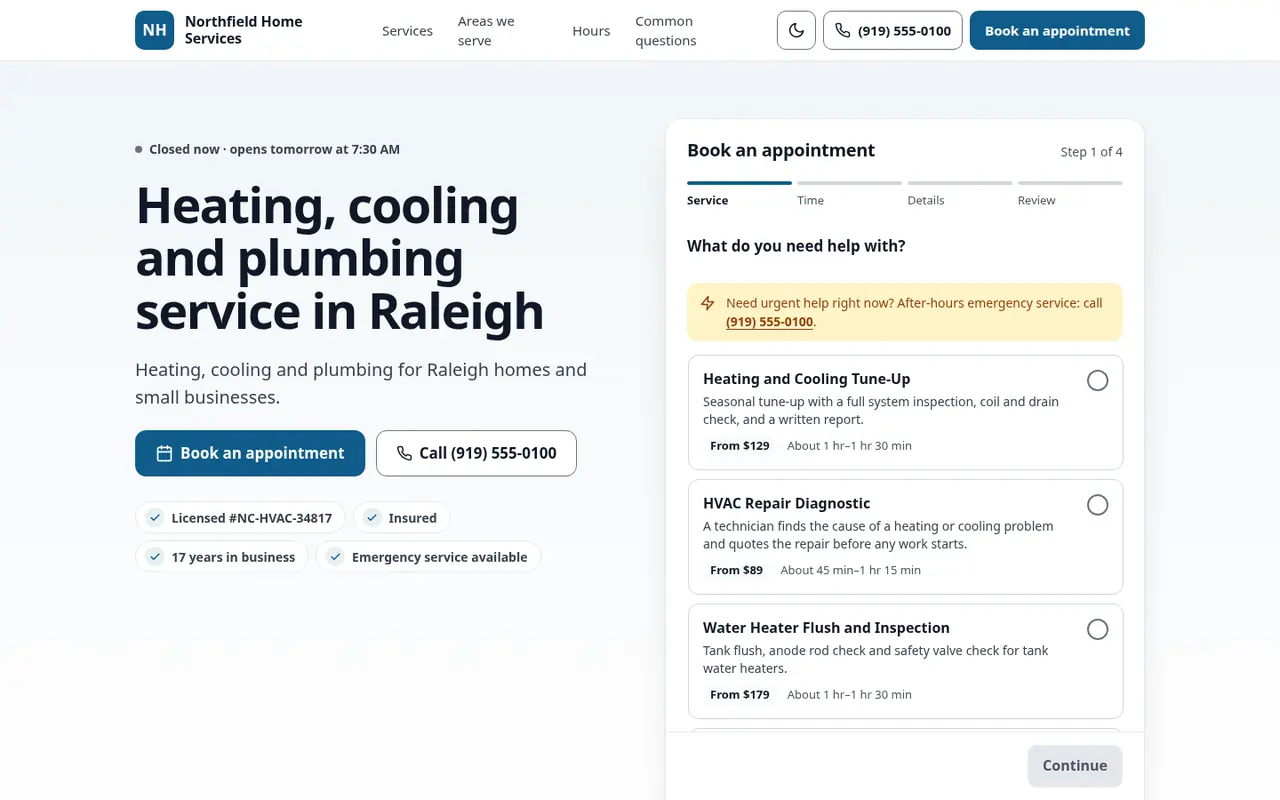
Show a maintenance tune-up "from $X", a no-cool diagnostic with its starting price, and a system replacement as "free estimate". In a 2024 survey reported by ACHR News, 70% of homeowners said they were more likely to call an HVAC contractor who is transparent on pricing.
Arrival Windows
Homeowners pick a date and a window, like 8 to 10 AM or 1 to 3 PM, not a 15-minute slot you'll miss the moment a condenser replacement runs long.
Your Service Area
List your cities and ZIP codes. A homeowner outside them is told so before the request is sent, and asked to call you instead.
Proof You're Legit
Your logo, your hours with an open-now badge, and trust badges such as licensed, insured and years in business, right on the page.
No Heat? No Cool? That's a Phone Call.
Your page has a call-now path for emergencies. Planned work is requested online, and no-heat calls on a January night still ring through.
Rooftop Units and Property Managers
Optional business fields collect the business name and an on-site contact, and the access notes box takes the details, like "roof hatch key at the front desk". It's all on the request your office reviews.
Get found on Google
Your booking page carries structured data that identifies it as an HVAC business (HVACBusiness), along with your hours, service area, services and FAQs, all at one address. Paste that address into the appointment link on your Google Business Profile. Here's how to add the link.
For shops without a website, the booking page can stand in for one.
From first tune-up to maintenance agreement
Booking brings the homeowner in. Service agreements keep them: coverage on the visits, contract response times, and renewal reminders before the term ends. It all runs in the same tool, on Pro and Enterprise.
HVAC Online Booking Questions
Do I need a separate booking app for HVAC?
No. The booking page is part of FSM Navigator, so a tune-up request lands in the same app you quote, schedule and dispatch from. When you approve it, it becomes a scheduled visit with the customer record attached.
Can homeowners book a maintenance tune-up online?
They can request one. Add the tune-up as a service with a starting price, and homeowners pick a date and one of your arrival windows. Your office approves the request before it goes on the schedule.
What about no-heat and no-cool emergencies?
Your page has a call-now path, so emergencies reach you by phone. The request form is for planned work.
Can I block ZIP codes outside my area?
Yes. List the cities and ZIP codes you serve. A homeowner outside them is told the address is outside your service area and asked to call instead.
Is the homeowner told what happens next?
Yes. They get an email confirming the request was received, and another when you approve it. Your staff get an email when the request arrives.
Does Google see it as an HVAC business?
The page carries LocalBusiness structured data that identifies your business as an HVAC business (HVACBusiness), along with your hours, service area, services and FAQs.
Which plans include it?
Pro and Enterprise. You can build and preview your page during the 14-day trial, and it goes public when the trial ends and your paid plan starts.
Let Homeowners Request Tune-Ups. Keep the Phones for Emergencies.
Build your booking page during your trial, and put it on Google when your plan starts.
14-day free trial · Nothing charged until the trial ends · Online booking is included on Pro and Enterprise