Online Booking for Plumbers Who Still Answer the Emergency Line
Burst pipes call. Water heaters can book. Give customers a page to request planned work in an arrival window you set, and approve it in the same app you quote, dispatch and invoice from.
Included in Pro and Enterprise · Build and preview your page during the trial · It goes public when your paid plan starts
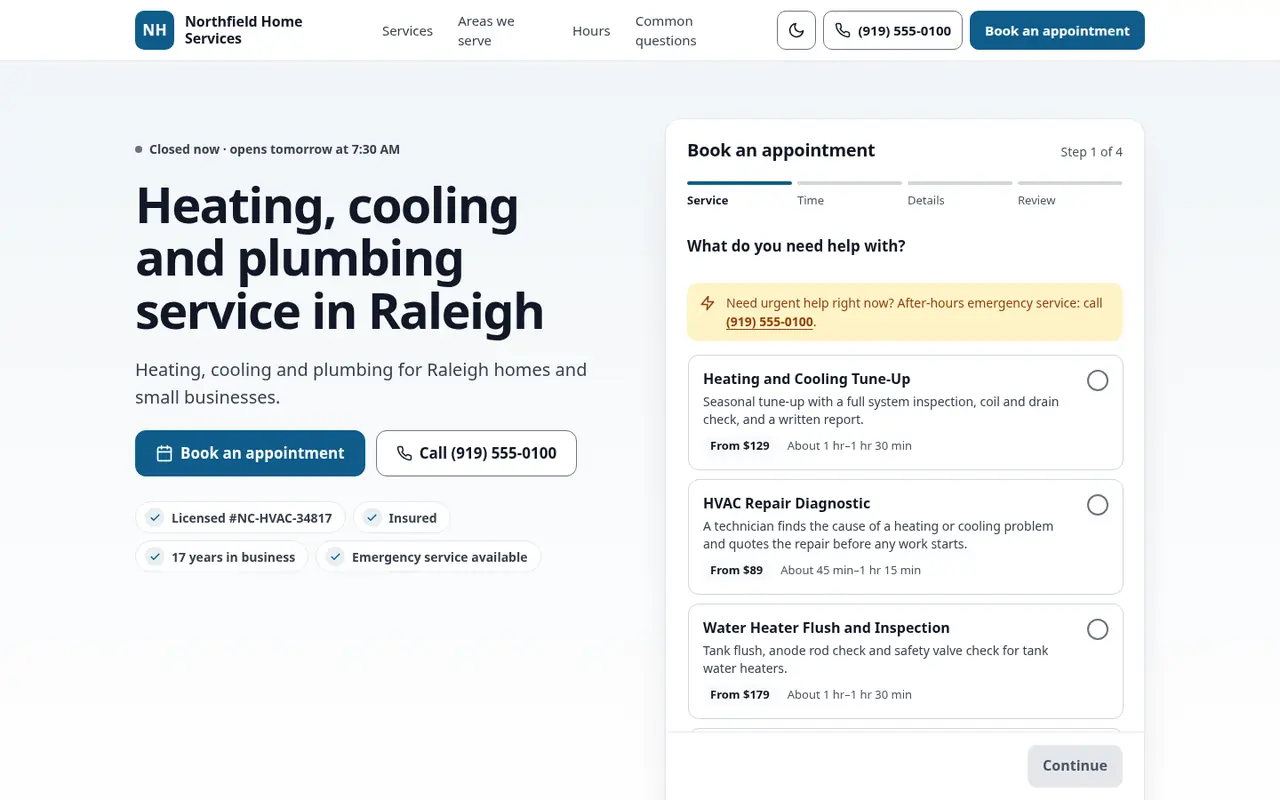
Two kinds of work, two doors
Emergencies need a person on the phone. Nobody with water coming through the ceiling wants to pick a window for Thursday.
Planned work is different. A water heater replacement, a drain cleaning, a fixture swap, a sewer camera inspection. Nobody's in a panic, so nobody calls back three times. If the phone goes to voicemail at 7 PM, the work goes to whoever picks up. One call-tracking company's platform data shows fewer than 3% of callers who reach voicemail leave a message.
Your booking page splits the two. There's a call-now path for emergencies, and a request form for everything that can wait until morning.
No second app to check every morning
If online requests land in a separate booking app, your office starts every day retyping them. With FSM Navigator®, the booking page is part of the tool you already run:
- The customer requests a water heater replacement estimate for Tuesday, 1 to 3 PM.
- The request lands in your Service Requests list. Your staff get an email, and the customer gets an email confirming it was received.
- You approve it, linking it to the customer you already have or creating a new one.
- It becomes a scheduled visit, and the customer is emailed that it was approved.
- If the job needs a price first, send a quote the customer signs online. From there it's dispatched, worked and invoiced like any other visit, and the customer is asked to rate it afterwards.
"Quoted on site" is a real option
Most plumbing repairs can't be priced until someone looks. So don't. Each service on your page can show:
- "From $X" for work with a predictable floor, like drain cleaning or a diagnostic visit
- "Free estimate" for replacements and installs
- "Quoted on site" for repairs where any number would be a guess
The services come from your pricebook.
Know the House Before You Go
The request form has an access notes box for the shut-off location, gate code or dog in the backyard. For commercial work, optional business fields collect the business name and an on-site contact. It's all on the request your office reviews.
Junk Stays Out
- Service-area check. Out-of-area ZIP codes are turned away with a note to call you.
- Only your services. Customers pick from what you list.
- Built-in security. Hidden trap fields, single-use form tokens and rate limits keep bots and spam out, and customer details are stored encrypted.
- Your approval. Anything odd still stops at your office.
Get found on Google
Your page carries structured data that identifies it as a plumber (Plumber), with your hours, service area, services and FAQs, all at one address. Paste that address into the appointment link on your Google Business Profile. Here's the step-by-step guide.
For shops without a website, the booking page can stand in for one.
Plumbing Online Booking Questions
Can customers book emergency plumbing online?
Emergencies go to your call-now number on the page. The request form is for planned work, like a water heater replacement or a drain cleaning.
Do I need a separate booking app?
No. Requests arrive in FSM Navigator, in your Service Requests list. When you approve one, you link it to an existing customer or create a new one, and it becomes a scheduled visit.
Do I have to publish my prices?
No. Each service can show a starting price, "free estimate" or "quoted on site". The services come from your pricebook.
What stops junk requests?
A service-area check by ZIP code, spam and bot protection on the form, a service list you control, and your approval on every request.
Is the customer told what happens next?
Yes. They get an email confirming the request was received, and another when you approve it. Your staff get an email when the request arrives.
Does Google see it as a plumbing business?
The page carries LocalBusiness structured data that identifies your business as a plumber (Plumber), along with your hours, service area, services and FAQs.
Which plans include it?
Pro and Enterprise. Build and preview your page during the 14-day trial. It goes public when the trial ends and your paid plan starts.
More for Plumbing Shops
Plumbing Software
Dispatch, work orders, invoicing and the mobile app for plumbing teams.
Customer Portal
Where your existing customers log in to see history and pay invoices.
Online Booking for HVAC
The same booking page, set up for tune-ups and planned HVAC work.
Plumbing Service Agreements
What to include, how to price each tier, and the margin math behind it.
Keep the Emergency Line. Let the Rest Come In Online.
Build your booking page during your trial, and put it on Google when your plan starts.
14-day free trial · Nothing charged until the trial ends · Online booking is included on Pro and Enterprise