Fire Protection Work Orders That Schedule Inspections Ahead of Their Due Dates.
Every system has its own inspection clock — monthly extinguisher checks, quarterly alarm tests, annual sprinkler inspections. FSM Navigator® turns those frequencies into work orders that generate themselves on schedule, turns deficiencies into approved repairs, and keeps every record ready for the day the AHJ asks.
✓ Recurring inspection schedules · ✓ Deficiency-to-repair flow · ✓ Records on every job
Where fire protection work orders fall apart
Frequencies tracked by memory
Hundreds of sites, each with systems on monthly, quarterly, semi-annual, and annual clocks — held together by a spreadsheet and someone's memory. A missed inspection isn't a scheduling slip; it's a compliance failure.
Deficiencies die in a notebook
The tech finds a corroded sprinkler head, writes it down, and moves to the next site. The repair never gets quoted, the customer never approves it, and earned revenue walks away with the notebook.
Records scattered when the AHJ asks
Inspection reports in email, deficiency photos on phones, sign-offs in a truck. When the AHJ or your customer's insurer asks for records, the scramble starts.
What if each inspection's due date scheduled its own work order — and the records filed themselves with the job?
From system type to dispatched inspection
- Template the inspection once
- Annual sprinkler inspection
- Set the frequency per system
- Monthly, quarterly, annual
- Every inspection after that
- Generates itself
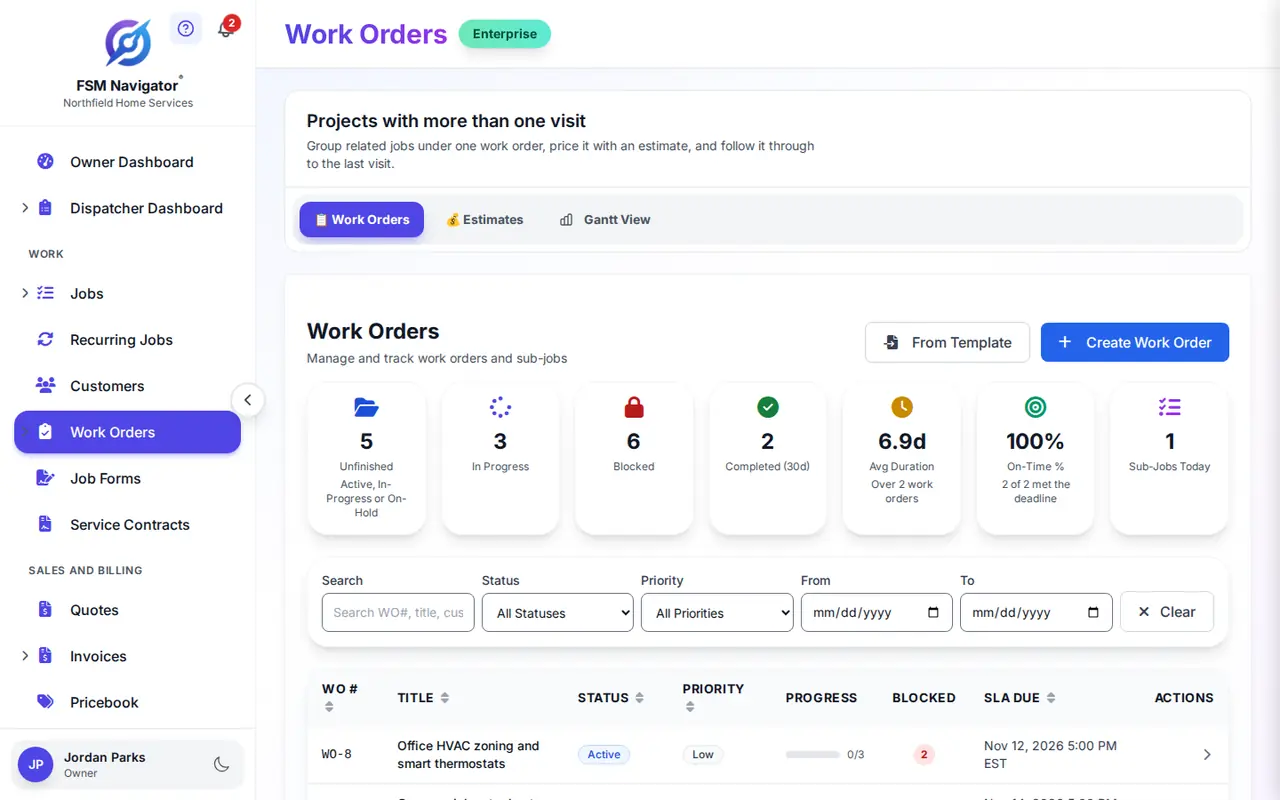
Recurring work orders generate from your templates on the cadence each system type needs — and can assign a certified technician based on your rules.
Work order management built for fire protection companies
Recurring inspection schedules
Extinguisher checks, alarm tests, sprinkler inspections — set the cadence per system type once and every inspection generates from its template when it comes due. No site slips.
Photos to approved repair
Attach photos and documents of what the tech found to the work order, build the repair estimate lines, and the customer approves the estimate online.
Records ready for the AHJ
Attach inspection reports, deficiency photos, and sign-offs to the work order from the field. Everything stays with the job and its customer history — findable when someone asks.
Certified techs on every system
Intelligent dispatch evaluates skills, certifications, availability, proximity, and workload — sprinkler work goes to a certified sprinkler tech, and alarm tests go to a tech qualified to run them.
Multi-visit corrections in sequence
Break a correction into dependent sub-jobs — isolate, repair, retest, sign off. Each stage unlocks when the previous one completes, visible on a timeline.
Contract response times, tracked
Track labor and material spend against the work order's budget, and see SLA due times on every job — so service contracts get the response their terms promise.
From system type to completed inspection in three steps
Template each inspection type
Build a work order template for each inspection — extinguisher check, alarm test, sprinkler inspection — and set the recurrence that matches each system type.
Work orders generate and dispatch
When an inspection comes due, the work order generates itself, and intelligent dispatch assigns a technician with the right certifications and availability.
Complete with records attached
The tech completes the inspection in the mobile app with reports, photos, and sign-offs attached — and deficiencies become estimates, then repair work orders.
Every frequency scheduled, every deficiency quoted, every record where the AHJ can see it.
Fire protection work orders, answered
Can inspection schedules generate work orders automatically?
Yes. Give each system type its own recurring schedule — monthly extinguisher checks, quarterly alarm tests, annual sprinkler inspections — and FSM Navigator generates the work order from your template when it comes due, ready for your team to schedule. No site slips through the cracks.
What happens when a technician finds a deficiency?
It becomes revenue instead of a note in a truck. Record the deficiency on the inspection work order with photos, build the repair estimate, and send it to the customer to approve online. The approved repair moves straight into scheduling as its own work order — with the inspection history attached.
Where do inspection records live when the AHJ asks?
On the work order. Technicians attach inspection reports, deficiency photos, and sign-offs from the mobile app, and the documents stay with the job and its customer history — so when the AHJ or your customer's insurer asks for records, you pull them up instead of digging for them.
Can it send a certified technician to the right system?
Yes. Intelligent dispatch evaluates skills, certifications, availability, proximity, and workload when it assigns a work order — so sprinkler inspections go to a tech certified for sprinkler work, and alarm tests go to a tech qualified to run them.
How does it handle multi-visit corrections?
Break the correction into sub-jobs with dependencies — isolate, repair, retest, sign off. Each stage unlocks when the one before it completes, and the timeline view shows where every correction stands — so the retest isn't dispatched before the repair is done.
Which plans include work order management?
Work order management is available on the Enterprise plan — including recurring work orders, sub-job dependencies, budget tracking, estimate approvals, and document attachments. Start with a 14-day free trial to explore the full system.
More for Fire Protection Teams
Work Orders for Your Trade
Get Ahead of Inspection Due Dates.
Inspection schedules that run themselves, deficiencies that become approved repairs, and records ready when the AHJ asks — built into the field service software your fire protection team already uses.
Start Your 14-Day Free TrialWork order management on Enterprise · 14-day free trial