Electrical Work Orders That Move From Permit to Final.
Panel upgrades and service changes don't fail on the wiring — they stall between stages. FSM Navigator® breaks the whole job into dependent stages that unlock in sequence, keeps permits and inspection sign-offs on the work order, and sends licensed electricians to the work that requires one.
✓ Dependent job stages · ✓ Permits on every job · ✓ Licensed-tech dispatch
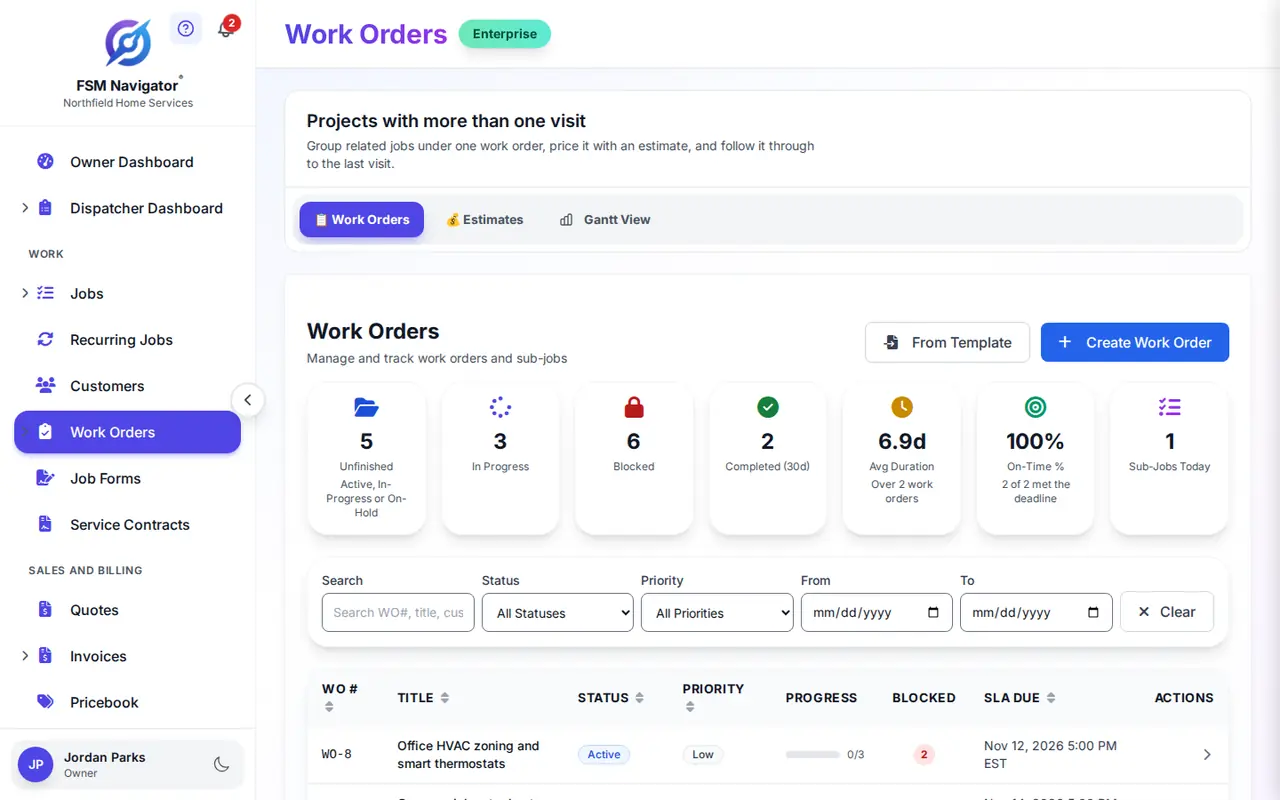
Where electrical work orders fall apart
Jobs stall between inspections
A crew shows up to trim out before the rough-in has passed, or the whole job sits idle because nobody knows which stage is actually next. Multi-stage work dies in the gaps.
Permit paperwork scattered everywhere
Permits in email, inspection sign-offs in a glove box, panel schedules in a photo roll. When the inspector or customer asks, nobody can find the record.
Licensed hands on apprentice work
Your master electrician spends the afternoon on a job an apprentice could run — while the panel upgrade that needs a license waits for him to free up.
What if every stage unlocked on its own — and the paperwork filed itself with the job?
From permit to final inspection without a stalled crew
- Scope the job once
- Panel upgrade
- Chain the stages
- Rough-in → Inspection → Trim-out → Final
- Each stage after that
- Unlocks on completion
Sub-job dependencies hold each stage until the one before it completes — visible on a timeline so dispatch never sends a crew to a stage that isn't ready.
Work order management built for electrical contractors
Stages that unlock in order
Break a panel upgrade into dependent sub-jobs — rough-in, inspection, trim-out, final. Each stage unlocks when the previous one completes, visible on a timeline.
Permits and sign-offs on the job
Attach permits, inspection sign-offs, panel schedules, and photos to the work order from the field. Everything stays with the job and its customer history.
Licensed work goes to licensed techs
Intelligent dispatch evaluates skills, certifications, availability, proximity, and workload — the service change goes to a licensed electrician, and your master isn't burned on a job an apprentice could run.
Recurring commercial maintenance
Annual maintenance for commercial accounts generates from its template when it comes due — set the schedule once and no account slips through the cracks.
Estimates customers approve online
Price the panel upgrade on the work order. The customer approves or declines online, the decision is recorded, and approved work moves straight to scheduling.
Budgets and SLA clocks
Track labor and material spend against the work order's budget, and see SLA due times on every job — so commercial accounts get the response their contract promises.
From permit to final in three steps
Break the job into dependent stages
Scope a panel upgrade or service change as sub-jobs — rough-in, inspection, trim-out, final — with dependencies that hold each stage until the one before it completes.
Dispatch the right electrician to each stage
As each stage unlocks, intelligent dispatch assigns a technician with the right skills, certifications, and availability — licensed work goes to a licensed electrician.
Close out with the paperwork attached
The tech completes each stage in the mobile app with permits, inspection sign-offs, and photos attached — so the job, its history, and its records live in one place.
Every stage in sequence, every permit on the job, every licensed hour spent on licensed work.
Electrical work orders, answered
Can it keep a panel upgrade from stalling between inspections?
Yes. Break the job into sub-jobs with dependencies: rough-in, inspection, trim-out, and final. Each stage unlocks when the one before it completes, and the timeline view shows the whole job at a glance — so a crew is never dispatched before the rough-in has passed.
Where do permits and inspection sign-offs live?
On the work order itself. Technicians attach permits, inspection sign-offs, panel schedules, and photos from the mobile app, and the documents stay with the job and its customer history — findable when an inspector or customer asks for them.
Can it send licensed electricians to the work that requires one?
Yes. Intelligent dispatch evaluates skills, certifications, availability, proximity, and workload when it assigns a work order — so licensed work goes to a licensed electrician, and your master isn't burned on a job an apprentice could run.
Can it handle annual maintenance for commercial accounts?
Yes. Set any work order to recur on a daily, weekly, monthly, or custom schedule. When a commercial account's annual maintenance comes due, FSM Navigator generates the work order from your template, ready for your team to schedule — no account slips through the cracks.
Can customers approve estimates online?
Yes. Build the estimate on the work order, send it to the customer, and they approve or decline online. The decision is recorded on the job, and approved work moves straight into scheduling.
Which plans include work order management?
Work order management is available on the Enterprise plan — including recurring work orders, sub-job dependencies, budget tracking, estimate approvals, and document attachments. Start with a 14-day free trial to explore the full system.
More for Electrical Teams
Work Orders for Your Trade
Run the Whole Job Without the Stalls.
Dependent stages that unlock in sequence, permits attached to the job, and licensed electricians on the licensed work — built into the field service software your electrical team already uses.
Start Your 14-Day Free TrialWork order management on Enterprise · 14-day free trial