Run your locksmith business from first call to repeat customer
Locksmith software for the business side of lockouts, rekeys, lock installs, commercial hardware and safe work: the board, the quote, the invoice and the payment in one app.
The technician app, the dispatch board, customer records and invoicing are on every plan, Free included.
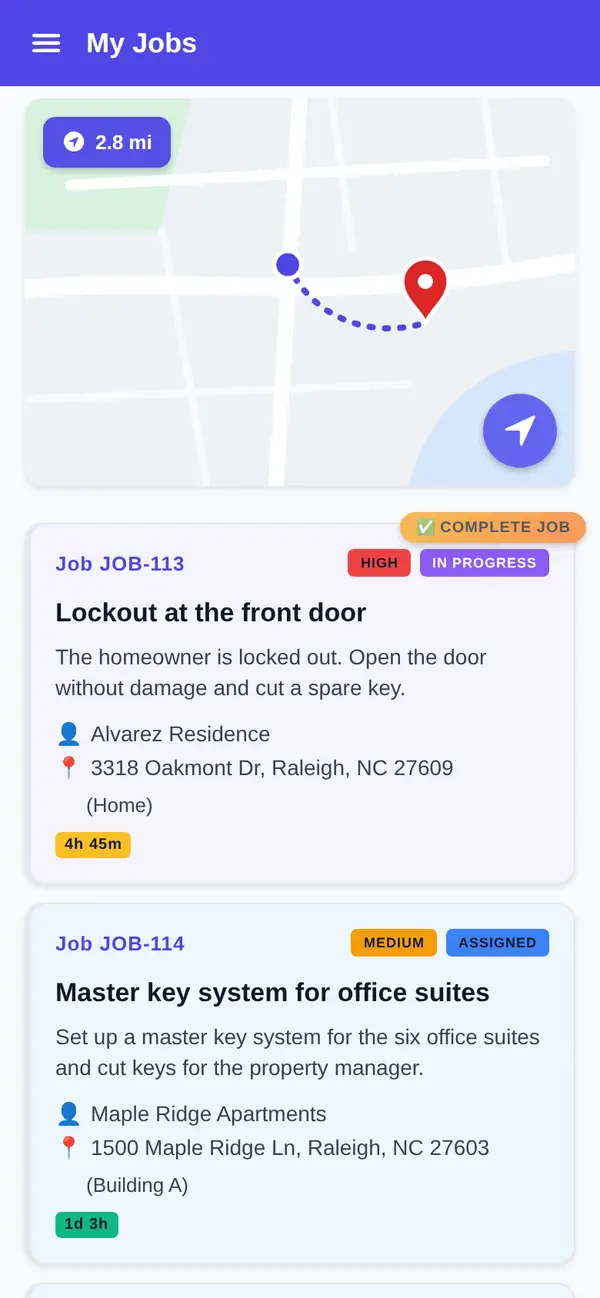
The 10:47 PM call and the 40-door rekey
It's 10:47 on a Tuesday night. A customer is standing in a grocery store lot, keys on the driver's seat. Your on-call tech is finishing a house lockout across town. Somebody has to decide who goes, write it down and make sure it gets billed.
At 7:30 the next morning, a property manager emails about rekeying 40 office doors onto a new master key system and swapping two exit devices. That's a quote, a parts order, a deposit and three days on the schedule.
That's the locksmith trade: hot calls that can't wait and planned work that pays the bills. FSM Navigator is a field service management app, one app from first call to repeat customer. It runs the business around the pick and the key machine.
What this locksmith software does, and what it doesn't
Straight answer first. FSM Navigator doesn't hold key codes, look up key blanks, program transponders or chart your keying systems. Keep the tools you already use for that.
It also won't promise your customer an arrival time. How fast a tech gets to a lockout depends on your crew, the hour and the traffic, and that promise is yours to make.
What it does is the rest of the day: who takes the call, what was quoted, what was done, what was paid and who the customer is next time.
Calls that come in hot
The board, on every plan
Lockouts come by phone. Every plan, Free included, has a dispatch board and calendar where you put the call on the schedule and assign it by hand, with live status. Technicians tap accepted, en route, in progress and complete, and each change shows on the board, which refreshes on its own through the day.
Every plan also includes technician GPS location, so you can see where each tech is before you pick one. The tech taps Navigate to open the job address in their maps app.
Dispatch that watches the day, on Pro
On Pro, intelligent dispatch matches the call to a technician by availability and working hours, current workload, proximity and SLA urgency. It keeps rebalancing as the day changes, and you can reassign anything by hand at any time. Certification tracking keeps each tech's license and certification dates in one place.
After-hours calls, on Enterprise
On Enterprise, you can connect a voice-agent platform as an AI receptionist. It answers the call, checks your open appointment windows and creates a service request that waits as Pending until your office confirms it. It doesn't promise a truck. For staffing nights and weekends, read about on-call rotations.
Checking ownership before you open the door
Most locksmiths confirm who they're letting in before they open a house or a car. On Pro, job forms and checklists let you build your own lockout checklist: ID checked, name matches the address or registration, notes on what was shown. Forms you set for a job type are added to every new job of that type. The tech completes the form in the app and collects the customer's signature. What you require is your policy and your state's rules; the checklist is how your techs follow it every time.
Locksmith scheduling software for the work you can plan
Rekeys after a move-in, deadbolt installs, a rental turnover and a safe that needs servicing can all wait for a slot. On Pro, customers pick a service and an arrival window on your online booking page and send a request. Every request waits for your approval before it goes on the schedule.
Online booking isn't for emergencies, and we'd tell you not to use it that way. Locked-out customers call. Booking is for the planned work, so the phone stays free for the calls that can't wait. If you're weighing it up, read should service businesses offer online booking.
Quotes for rekeys, hardware and commercial jobs
Good, better and best, signed on the customer's phone
On Pro, quotes are built from your pricebook with up to three options, good, better and best. Rekey the existing locks, replace them with new deadbolts, or upgrade to keypad deadbolts on the front and back doors. The customer picks one and signs it from their phone, and can pay the deposit online from your customer portal. You turn the signed quote into a job, and the final invoice bills the option they signed, minus the deposit.
Deposits matter on commercial work, where you often order exit devices, closers or high-security cylinders before the first visit. Here's how much deposit to ask for, and why good, better and best pricing works.
Sign up free, then start a 14-day Pro or Enterprise trial from your account. A payment method is collected when the trial starts and isn't charged until the trial ends.
Photos of the door before and after
On Pro, attach photos to the job, up to 10 per job: the drilled cylinder, the frame damage that was there when you arrived, the finished install. When a customer or a property manager asks what happened, the answer is on the job.
A locksmith invoicing app that works at the door
Invoicing is on every plan, Free included, with PDF invoices and up to 100 invoices a month on Free. You invoice from the job, so the work done is already on it, whether that's a 2 AM car lockout or the third day of a rekey.
On Pro, there's no monthly invoice cap, and customers pay online by card or bank transfer (ACH, US bank accounts) from the customer portal. Payments settle to your own Stripe account; Stripe's processing fees and a platform fee apply (see pricing). If your books are in QuickBooks Online, Pro can send customers, invoices and payments to it, and you choose what syncs automatically. More on invoicing and payments.
Licenses that don't lapse on you
Some states license locksmiths. California, for one, says that no person may engage in the business of a locksmith without a license from its Bureau of Security and Investigative Services (opens in a new tab). Check your own state's rules.
On Pro, certification tracking stores each technician's certifications with expiry dates and sends reminders 30 days ahead, 7 days ahead, on the day, and once more just after it expires. See how to track technician license expirations.
Customers who call you next time
Customer records are on every plan, Free included: every customer and service location in one place, with their jobs, invoices and history. When an office manager calls about the same building, you can see which doors you rekeyed and what you charged.
After a completed job, customers are asked for a rating on every plan. On Pro, everyone who rates sees your Google review link once you add it, and low ratings alert your team.
Free or Pro for a locksmith
Here's the honest split. Free covers up to 5 users with the technician app (offline-first, so a basement mechanical room doesn't stop it), the dispatch board, GPS location, Navigate, customer records and invoicing. It suits a shop that takes calls by phone, assigns by hand and gets paid in person.
Pro adds intelligent dispatch, online booking, quotes with signatures and deposits, job photos, job forms, certification tracking, online payments and Google review invites. Pro is $34.99 per user per month, or $27.99 per user per month billed annually, with no user limit. Pricing is per user, and anyone who logs in, including whoever answers your phone, is a user.
What you get
- The board on every plan. Assign calls by hand with live status (Free).
- Dispatch that watches the day. Intelligent dispatch by availability, workload, proximity and SLA urgency (Pro).
- Quotes with deposits. Good, better and best options, signed on the phone (Pro).
- Invoice from the job. On every plan; card and ACH online on Pro.
- Your lockout checklist. Job forms and signatures in the app (Pro).
- License reminders. 30 days, 7 days, on the day and once more just after (Pro).
Go deeper
Scheduling and dispatch board
Assign calls by hand on every plan.
Read moreQuotes
Good, better and best options with e-signature and deposits.
Read moreOnline booking
Requests you approve before they hit the schedule.
Read moreMobile app
The offline-first technician app on every plan.
Read moreCertification tracking
Expiry dates and reminders for licenses and certifications.
Read moreLocksmith software questions
What is locksmith software?
It's software that runs a locksmith business: taking calls, scheduling and dispatching techs, quoting, invoicing and keeping customer records. FSM Navigator is a field service management app that covers that job management side for lockouts, rekeys, lock installs and commercial hardware work. It doesn't hold key codes, look up key blanks or program transponders, so keep the tools you use for those.
Can I dispatch emergency lockouts with FSM Navigator?
Yes. Every plan, Free included, has a dispatch board where you assign calls by hand, see job status and see each technician's GPS location. On Pro, intelligent dispatch matches calls to technicians by availability, workload, proximity and SLA urgency. FSM Navigator doesn't promise customers an arrival time; how quickly a tech gets there is up to your crew and your judgment.
Should locksmiths use online booking for lockouts?
No. Lockouts come by phone, and they should. Online booking, on Pro, suits planned work such as rekeys, lock installs and safe servicing. Customers pick a service and an arrival window and send a request, and every request waits for your approval before it goes on the schedule. That keeps the phone line open for the calls that can't wait.
Can I record proof of ownership before a lockout?
On Pro, you can build your own job forms and checklists, such as ID checked and name matching the address or vehicle registration. The technician completes the checklist in the app and collects the customer's signature. FSM Navigator doesn't verify identity itself or set the rules; what you require is your policy and your state's rules, and the checklist helps every tech follow it.
Can I invoice and take payment on the spot?
Invoicing with PDF invoices is on every plan, Free included, up to 100 invoices a month on Free. You invoice from the job, so the work is already on it. On Pro, there's no monthly cap, and customers pay online by card or bank transfer from the customer portal, with payments settling to your own Stripe account. A platform fee applies; see the pricing page.
Can it remind me when a technician's license expires?
Yes, on Pro. Certification tracking stores each technician's certifications with expiry dates and sends reminders 30 days ahead, 7 days ahead, on the day, and once more just after it expires. Licensing rules vary by state, so check what yours requires.
How much does it cost?
FSM Navigator has a Free plan for up to 5 users with no credit card. Pro is $34.99 per user per month, or $27.99 per user per month billed annually, and Enterprise is $59.99 per user per month, or $47.99 billed annually. Paid plans have no user limit. A platform fee applies to online payments; see the pricing page. Sign up free, then start a 14-day Pro or Enterprise trial from your account. A payment method is collected when the trial starts and isn't charged until the trial ends.
Put tonight's on-call tech on the board.
The technician app, the dispatch board, customer records and invoicing are on every plan, Free included. Add your crew and take the next call from one app.
Sign up free, then start a 14-day Pro or Enterprise trial from your account. A payment method is collected when the trial starts and isn't charged until the trial ends.