Run your garage door business from first call to repeat customer
Garage door service from the broken-spring call to the signed quote, the invoice and next year's tune-up, in one field service management app.
The technician app, the schedule board and invoicing are on every plan, Free included.
When a spring lets go at 7 AM
It's 7:10 on a Monday. A customer's car is stuck behind a door that won't lift because a spring snapped overnight, and she needs to get to work. Your tech is finishing an opener install across town, two more calls are on hold, and last week's new-door quote is still a sheet of paper in somebody's truck.
That's the garage door business. The repair calls keep the lights on. The ticket grows when your tech stands in the driveway and gives the customer a real choice, and it shrinks when the quote goes home on paper and the customer calls someone else.
Garage door software should keep both in one place. FSM Navigator is a field service management app, one app from first call to renewals: the customer, the schedule, the invoices and next year's tune-up plan all live on the customer's record.
Garage door software that quotes three ways in the driveway
Good, better and best from your pricebook
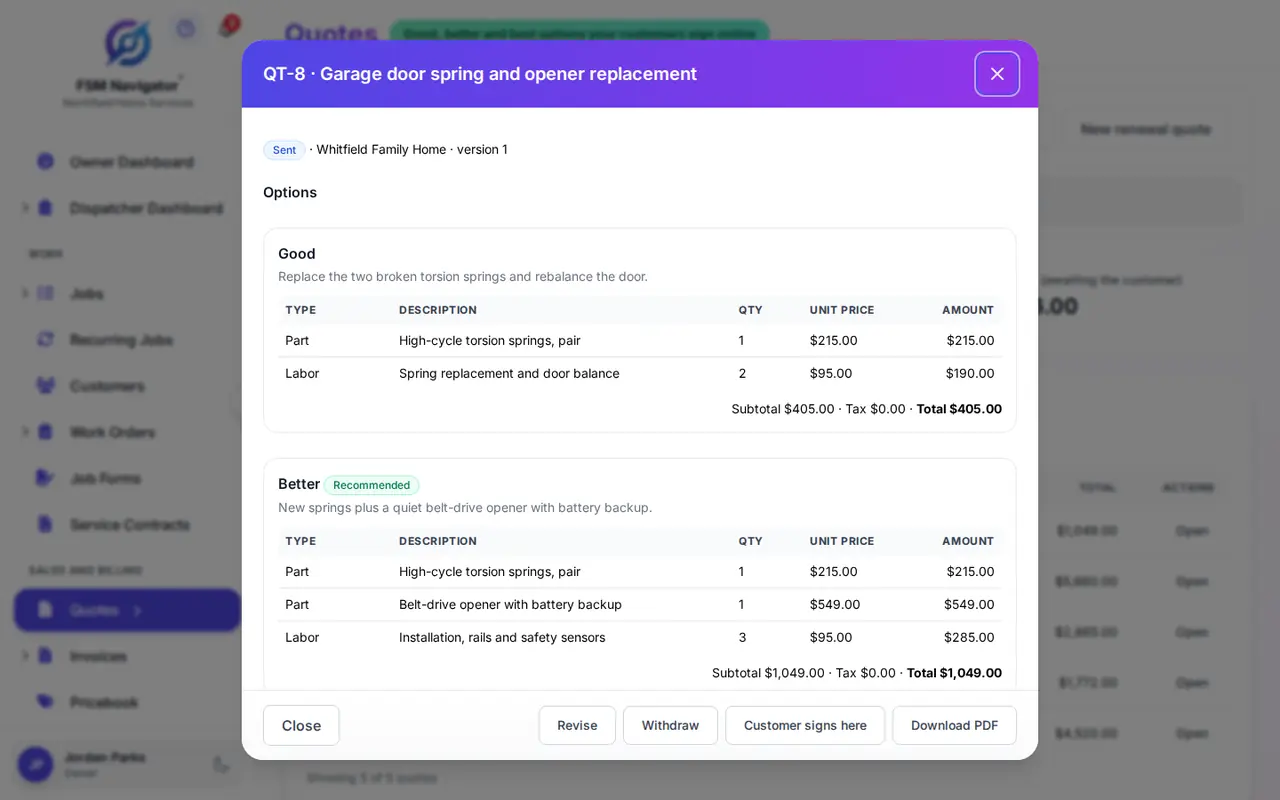
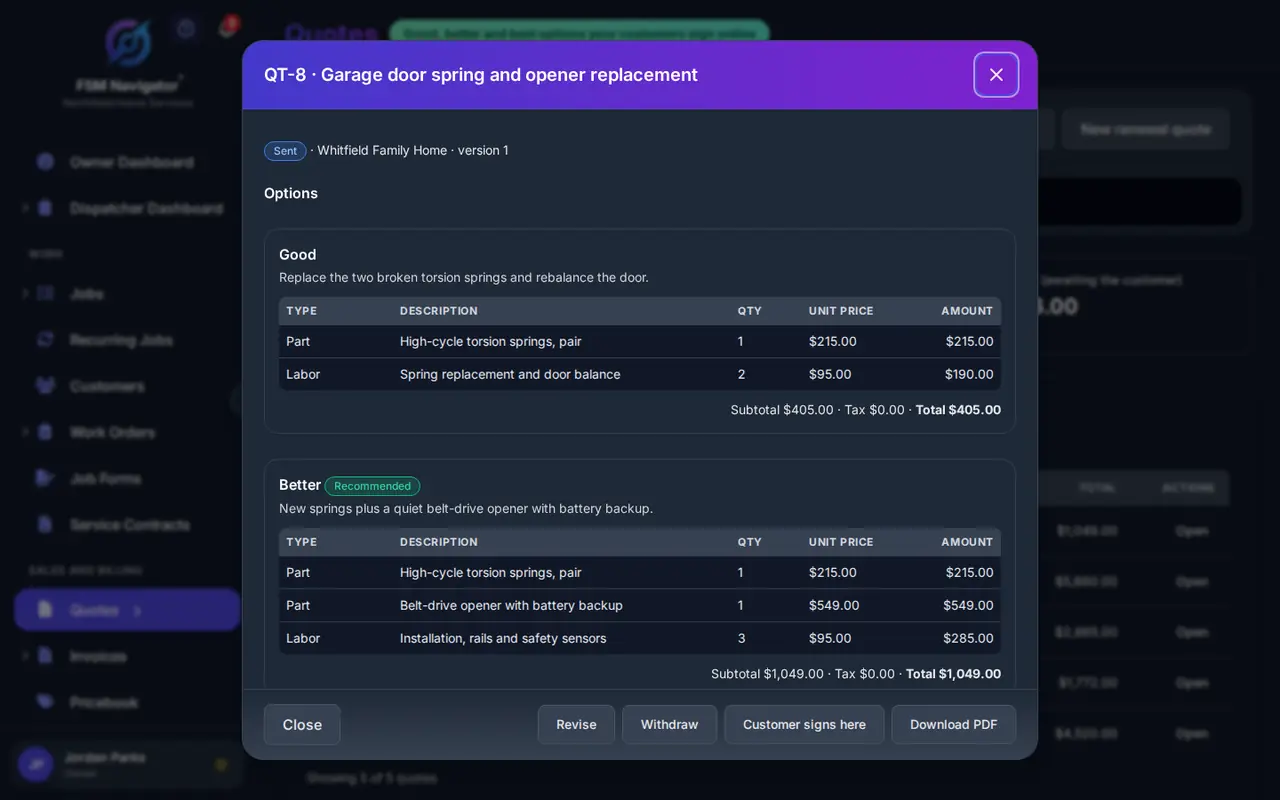
On Pro, quotes are built from your pricebook with up to three options, good, better and best. On a broken-spring call, that might be: replace the broken spring; replace both springs and tune up the opener; or put in a new door.
You set every price in your own pricebook, so the tech isn't doing math on the tailgate and two techs don't quote the same job two ways. Three options change the conversation from "yes or no" to "which one." More on good, better and best pricing.
Signed on the customer's phone, deposit paid online
The customer picks an option and signs it from their phone, and can pay the deposit online from your customer portal. You turn the signed quote into a job, and the final invoice bills the option they signed, minus the deposit, so nobody re-keys the price. On a new door, a deposit before you order is the difference between a sale and a maybe; here's how much deposit to ask for. See how quotes work.
Sign up free, then start a 14-day Pro or Enterprise trial from your account. A payment method is collected when the trial starts and isn't charged until the trial ends.
The board on a day of spring calls
Every plan includes a visual dispatch board and calendar where you schedule and assign work by hand, with SLA tracking and live job status. The board refreshes on its own through the day. For a two-truck shop that's often all you need. See scheduling.
When the phone won't stop, Pro adds intelligent dispatch. It matches each call to a technician by evaluating availability and working hours, current workload, proximity and SLA urgency, and it keeps rebalancing through the day as conditions change. Installs you assign by hand stay with that crew while rebalancing moves the repair calls. You can reassign anything by hand at any time.
Springs and openers on the van
On Enterprise, inventory includes technician van stock, and parts used on a job come out of that tech's van stock and are recorded against the job. Intelligent dispatch on Enterprise won't assign a technician whose van stock doesn't have the job's required parts, so a tech isn't leaving a customer's driveway for a supply-house run. Plans and prices are on pricing.
In the technician's hand
Native iOS and Android apps are on every plan, Free included. Techs see their assigned calls, update status with one tap and add notes. They tap Navigate to open the job address in their phone's maps app. The app is offline-first, so a tech working in a detached garage or a basement shop with no signal keeps going, and changes sync when the phone reconnects. The office sees each tech's GPS location on every plan. More on the mobile app.
On Pro, techs attach photos to the job, up to 10 per job: the frayed cable, the bent track section, the finished install. When a customer asks what was wrong, you show them. Techs also complete job forms and checklists, like a door balance and safety-reverse check your shop writes itself, and collect the customer's signature on the phone.
New calls and repeat customers
Online booking with your approval
On Pro, customers pick a service and an arrival window on your online booking page and send a request. Every request waits for your approval before it goes on the schedule, so a tune-up request doesn't land on top of a full day of spring calls.
Annual tune-ups as a plan
Plenty of shops already sell an annual tune-up. On Pro, set it up as a membership plan: an agreement sold at a set price, with member pricing on repairs. Agreements schedule their own visits, and renew automatically when the customer has agreed to auto-renewal. Once your Stripe account is connected, customers can pay for them automatically by card. You name each plan the way your customers know it. See membership plans.
Reviews after the door is fixed
After a completed job, customers are asked for a rating on every plan. On Pro, everyone who rates sees your Google review link once you add it, and low ratings alert your team, so you hear about a noisy opener before the neighbors do.
Get paid for the work
Invoicing is on every plan, Free included, up to 100 invoices a month on Free. You invoice from the job. On Pro, there's no monthly invoice cap, and customers pay online by card or bank transfer (ACH, US bank accounts) from the customer portal, settling to your own Stripe account. On Pro, you can also send invoices and payments to QuickBooks Online, and you choose what syncs automatically. Stripe's processing fees and a platform fee apply; see pricing. Details are on invoicing and payments.
Free or Pro for a garage door company
Here's the honest split. Free covers up to 5 users with the technician app, GPS location, Navigate, the schedule board, customer records and invoicing. It suits a shop that quotes on paper today and wants the calls and invoices in one place first.
Pro is where the garage door story lives: good, better and best quotes with signatures and deposits, online booking, photos and checklists, tune-up plans, Google review invites, intelligent dispatch and online payments. Pro is $34.99 per user per month, or $27.99 per user per month billed annually, with no user limit. Pricing is per user, and office staff who log in are users too. Enterprise adds inventory, van stock and parts-aware dispatch.
What you get
- Quotes with three options. Good, better and best from your pricebook, signed, with a deposit invoice (Pro).
- A signed quote becomes the job. You convert it in one step; the invoice bills the option they signed (Pro).
- Offline-first technician app. Keeps working without signal, on every plan.
- Navigate and GPS location. Open the address in your maps app; see where techs are (every plan).
- Tune-up plans. Visits scheduled, with renewal when the customer has agreed to auto-renew (Pro).
- Invoice from the job. On every plan; online payments on Pro.
Go deeper
Quotes
Good, better and best options, e-signature and deposits.
Read moreOnline booking
Requests that wait for your approval.
Read moreMobile app
The offline-first technician app on every plan.
Read moreScheduling
The board and calendar on every plan.
Read moreMembership plans
Set-price plans with member pricing and automatic card payments.
Read moreGarage door software questions
What does garage door software do?
It keeps a garage door service business in one place: customer records, the schedule board, the technician app and invoicing. In FSM Navigator, those are on every plan, Free included. On Pro you add good, better and best quotes signed with a deposit, online booking, job photos and checklists, tune-up plans, Google review invites, intelligent dispatch and online payments by card or bank transfer.
Can I give customers good, better and best options on a garage door repair?
Yes, on Pro. Quotes are built from your pricebook with up to three options, for example replacing the broken spring, replacing both springs with an opener tune-up, or a new door. The customer picks one and signs it from their phone, and can pay the deposit online from your customer portal. You turn the signed quote into a job, and the final invoice bills the option they signed, minus the deposit.
Can customers book a garage door repair online?
Yes, on Pro. Customers pick a service and an arrival window on your booking page and send a request. Every request waits for your approval before it goes on the schedule, so you decide what fits around the urgent calls. On Enterprise, you can also put the booking widget on your own website.
Can I sell annual garage door tune-ups as a plan?
Yes, on Pro. Set up the tune-up as a membership plan: an agreement sold at a set price, with member pricing on repairs. Agreements schedule their own visits, and renew automatically when the customer has agreed to auto-renewal. Once your Stripe account is connected, customers can pay for the plan automatically by card. You name each plan the way your customers know it.
Does the technician app work without cell signal?
Yes. The iOS and Android apps are offline-first and included on every plan, Free included. A tech in a garage or basement with no signal keeps updating status and adding notes, and changes sync when the phone reconnects. Techs tap Navigate to open the job address in their phone's maps app, and the office sees each tech's GPS location on every plan.
Can FSM Navigator track springs and openers on each truck?
Yes, on Enterprise. Inventory includes technician van stock, and parts used on a job come out of that tech's van stock and are recorded against the job. On Enterprise, intelligent dispatch also won't assign a technician whose van stock doesn't have the job's required parts, so the tech doesn't have to leave the customer for a parts run.
How much does garage door software cost?
FSM Navigator has a Free plan for up to 5 users with no credit card. Pro is $34.99 per user per month, or $27.99 per user per month billed annually, and Enterprise is $59.99 per user per month, or $47.99 billed annually. Paid plans have no user limit. A platform fee applies to online payments; see the pricing page. Sign up free, then start a 14-day Pro or Enterprise trial from your account. A payment method is collected when the trial starts and isn't charged until the trial ends.
Put tomorrow's spring calls on the board.
The technician app, GPS location, Navigate, the schedule board and invoicing are on every plan, Free included. Add your techs and run tomorrow's calls from the phone.
Sign up free, then start a 14-day Pro or Enterprise trial from your account. A payment method is collected when the trial starts and isn't charged until the trial ends.