Run your pool service business from first visit to renewal
Weekly service, spring openings, fall closings, green-pool cleanups and pump, filter and heater repairs for your pool cleaning business, in one field service management app.
The technician app, the schedule board and invoicing are on every plan, Free included.
When the service day breaks
It's Tuesday, and Tuesday is full. Then a customer calls about a pool that went green over a long weekend, a heater won't fire at a house two streets over, and your newest tech texts a photo of a pump that's screaming. Meanwhile it's late April and forty openings are waiting for a date.
The weekly stops are the base of the business. The money that makes the year is in the openings, the closings, the cleanups and the equipment work, and that's the part that falls through a notebook.
Good pool service software keeps both in one place. FSM Navigator is a field service management app, one app from first call to renewals. Every customer and service location has its own record with its jobs and invoices.
Pool service software built around the pool year
Weekly service that repeats itself
On Pro, recurring jobs repeat on their own. Set up a customer's weekly visit once and it lands on the schedule every week, on one fixed weekday, so nobody rebuilds Tuesday from a spreadsheet on Monday night. Biweekly works the same way, every other week. You can still move or reassign any visit by hand.
Openings and closings on a service agreement
Most pool companies already sell some kind of season package: an opening in spring, weekly care through the summer, a closing in fall. On Pro, service agreements are set up for the customer and the site, and they schedule their own visits. Name each agreement or plan whatever your customers call it: maintenance agreement, service contract or membership. For an opening in April and a closing in October, set the agreement's visits to every six months, starting in April. You get a renewal notice before an agreement ends, and membership plans paid by card can renew automatically when the customer agrees to it.
Membership plans are agreements sold at a set price, with member pricing on repairs. Once your Stripe account is connected, customers can pay for them automatically by card. Here's more on autopay for maintenance plans, and on service agreements.
Green pools and equipment repairs, quoted before the customer calls someone else
A green pool is a sale if you quote it in time. On Pro, quotes are built from your pricebook with good, better and best options: a one-visit cleanup, a multi-visit recovery, or recovery plus a filter clean. The same goes for a failing pump: repair the motor, replace the pump, or upgrade it. The customer picks one and signs from their phone. If you take deposits, the deposit goes out as its own invoice the customer pays online in your customer portal. Deposits are available once online payments are set up, and they're off while Stripe Tax collects your sales tax.
You turn the signed quote into a job in one step, and the final invoice bills the option they picked at the signed price, minus the deposit.
Sign up free, then start a 14-day Pro or Enterprise trial from your account. A payment method is collected when the trial starts and isn't charged until the trial ends.
The weekly service day, in the technician's hand
An app that keeps working in the backyard
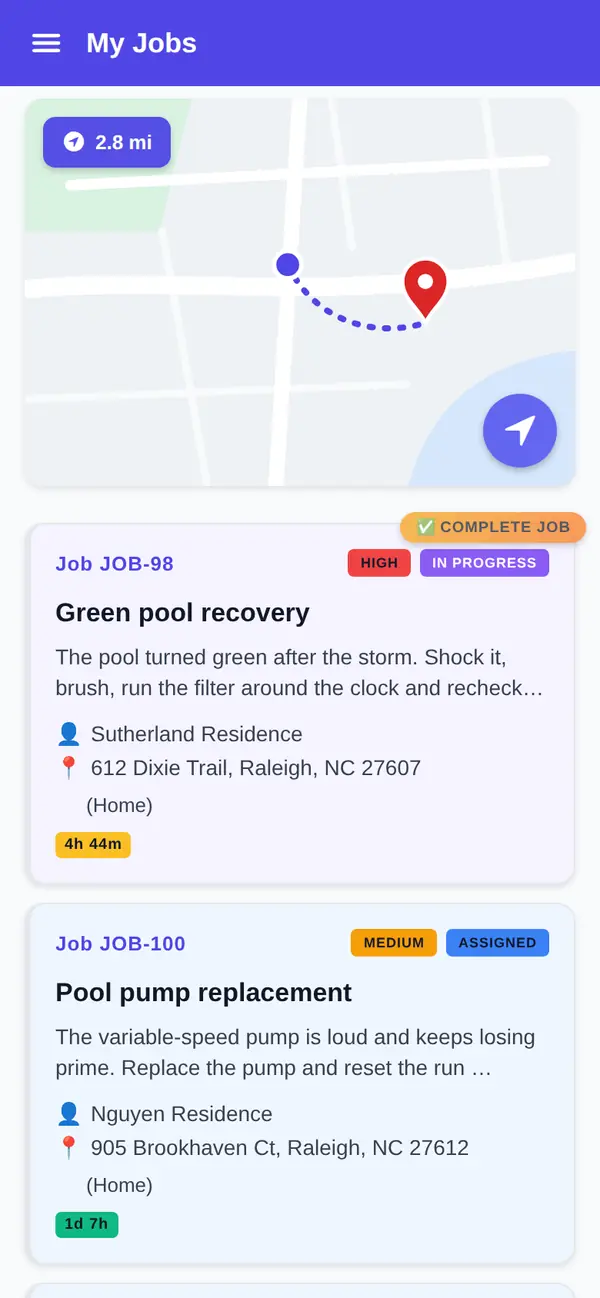
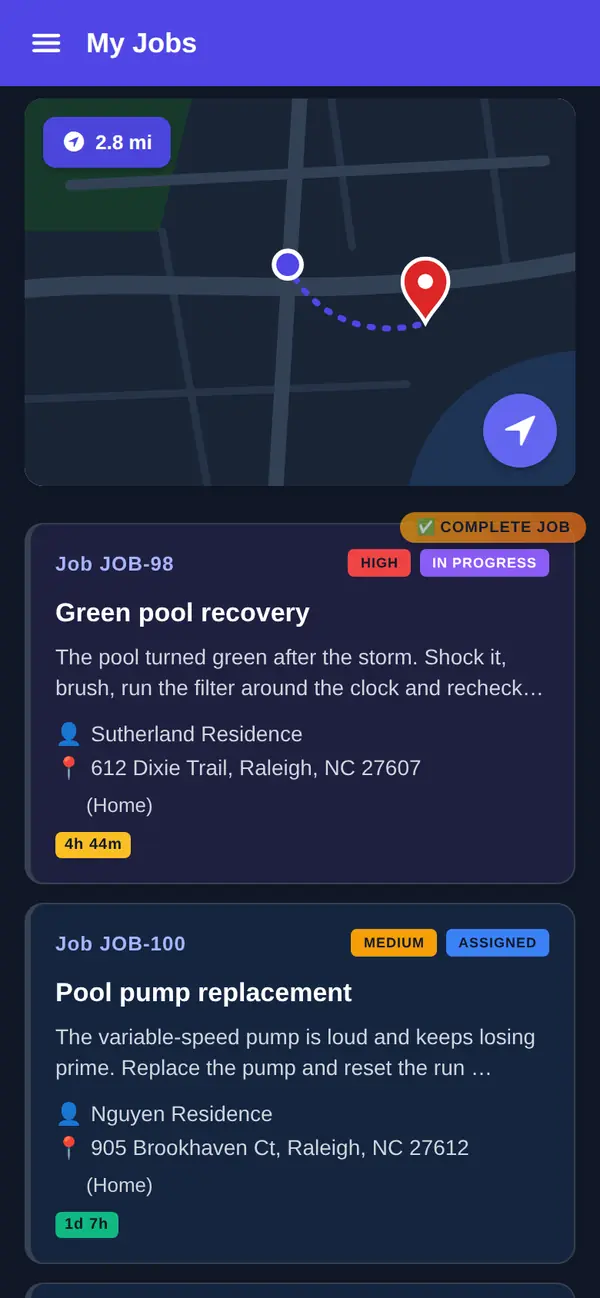
Native iOS and Android apps are on every plan, Free included. Technicians see their assigned visits, update status as they go and add notes. The app is offline-first, so a tech at a pool behind a canyon house with no bars keeps working, and changes sync when the phone reconnects. More on the mobile app.
Navigate, and GPS location for the office
Technicians tap Navigate to open the next address in their phone's maps app. Every plan includes technician GPS location, so the office can see where technicians on duty are before telling a customer when to expect them.
Photos and checklists, built your way
On Pro, technicians attach photos to the visit (up to 10 per job): the water when they arrived, the cleaned filter, the leaking union at the equipment pad. When a customer says the pool wasn't serviced, you have the record. Here's why photo documentation settles those calls.
Technicians also complete job forms and checklists and collect the customer's signature, see job forms and signatures. You build the checklist yourself, with pass or fail checks, notes, choices and readings that carry a unit, such as filter pressure: baskets emptied, walls brushed, filter pressure checked.
To be straight about it: FSM Navigator doesn't calculate water chemistry, suggest doses or track chemical usage. If your techs need a chemistry calculator in the app, pool-specific tools do that. If you track chemistry the way you do it today and need the rest of the business in one place, read on.
The board when the week goes sideways
Every plan includes a visual schedule board and calendar where you schedule and assign visits by hand, with status updates from techs throughout the day. The board refreshes on its own. That's enough for a two-truck shop with a fixed service day per neighborhood. See scheduling.
When the mid-week calls outgrow hand assignment, Pro adds intelligent dispatch. It evaluates availability, current workload, proximity and SLA urgency, and keeps rebalancing through the day as conditions change. You can reassign anything by hand at any time.
New customers and reviews
On Pro, customers pick a service and an arrival window on your online booking page and send a request. Every request waits for your approval before it goes on the schedule, so you decide which openings you can take in the April rush.
After a completed visit, customers are asked for a rating on every plan. On Pro, everyone who rates sees your Google review link, and low ratings also reach you privately, so you hear about the missed corner of the deep end before the neighbors do.
Get paid for the week, every week
Invoicing is on every plan, Free included (up to 100 invoices a month on Free). You invoice from the job. On Pro, there's no monthly invoice cap, and customers pay online by card or bank transfer (ACH) from the customer portal, settling to your own Stripe account. Stripe's processing fees and a platform fee apply; see pricing. The details are on invoicing and payments.
Free or Pro for a pool company
Here's the honest split. Free covers up to 5 users with the technician app, GPS location, Navigate, the schedule board, customer records and invoicing. It suits a shop that mostly runs repair calls and keeps its weekly list somewhere else.
Pro is where the pool year lives: recurring weekly visits, service agreements and membership plans, quotes with deposits, photos and checklists, online booking, review requests, intelligent dispatch and online payments. Pro is $34.99 per user per month, or $27.99 per user per month billed annually, with no user limit. Pricing is per user, and office staff who log in are users too.
What you get
- Weekly visits that repeat. Set up once, on the schedule every week (Pro).
- Openings and closings on agreements. Visits scheduled by the agreement (Pro).
- Repair quotes with options. Good, better and best, signed by the customer, with an optional deposit (Pro).
- Offline-first technician app. Keeps working without signal, on every plan.
- Navigate and GPS location. Open the address in your maps app; see where techs are (every plan).
- Invoice from the job. On every plan; online payments on Pro.
Go deeper
Service agreements
Agreements that schedule their own visits, for the customer and the site.
Read moreMembership plans
Set-price plans with member pricing and automatic card payments.
Read moreScheduling
The board and calendar on every plan.
Read moreInvoicing and payments
Invoice from the job; online payments on Pro.
Read moreRenewals
What keeps customers on the plan year after year.
Read the articleRelated trades
Common questions about pool service software
What does pool service software do?
It keeps a pool cleaning business in one place: customer records and locations, the schedule board, the technician app and invoicing. In FSM Navigator, those are on every plan, Free included. On Pro you add recurring weekly visits, service agreements for openings and closings, good, better and best quotes for repairs, job photos and checklists, online booking and online payments by card or bank transfer.
Can I sell openings and closings as pool maintenance agreements?
Yes, on Pro. Pool maintenance agreements live in FSM Navigator as service agreements for the customer and the site. They schedule their own visits. You name each agreement or plan yourself: maintenance agreement, service contract or membership. Membership plans can carry member pricing on repairs, and customers can pay automatically by card once your Stripe account is connected. You get a renewal notice before an agreement ends, and membership plans paid by card can renew automatically when the customer agrees to it.
Can I set up weekly pool service visits once?
Yes, on Pro. Recurring jobs repeat on their own, so a weekly visit set up once keeps landing on the schedule without anyone retyping it. A weekly schedule runs on one fixed weekday. You can still move or reassign any visit by hand on the schedule board, for example when a holiday shifts a service day or a tech is out sick.
Does FSM Navigator track water chemistry or chemical dosing?
No. FSM Navigator doesn't calculate water chemistry, recommend doses or track chemical usage. On Pro, you can build your own job forms and checklists for the steps your techs follow on each visit, and they attach photos and collect a signature. If an in-app chemistry calculator is essential to your service, a pool-specific tool may suit you better.
Does the technician app work without cell signal?
Yes. The iOS and Android apps are offline-first and included on every plan, Free included. A technician in a backyard with no signal keeps updating status and adding notes, and changes sync automatically when the phone reconnects. On Pro, technicians also attach photos, complete checklists and collect the customer's signature in the same app.
Can technicians open the next address in their maps app?
Yes. Technicians tap Navigate to open the job address in their phone's maps app, on every plan. FSM Navigator doesn't plan the day's drives itself. The office sees where technicians on duty are on every plan, and on Pro intelligent dispatch weighs proximity along with workload and availability when it assigns a new call.
How much does pool service software cost?
FSM Navigator has a Free plan for up to 5 users, and signing up for it needs no card. Pro is $34.99 per user per month, or $27.99 per user per month billed annually, and Enterprise is $59.99 per user per month, or $47.99 billed annually. Paid plans have no user limit and a 14-day free trial; a card is required to start the trial and isn't charged until it ends. A platform fee applies to online payments; see the pricing page.
Get next week's service day on the board.
The technician app, GPS location, Navigate, the schedule board and invoicing are on every plan, Free included. Add your techs and run your next service day from the phone.