Run your irrigation business from first call to renewal
Irrigation business software for the whole irrigation and sprinkler service year: spring start-ups, repair calls, fall winterizations and backflow tests, in one field service management app.
The technician app, the schedule board and invoicing are on every plan, Free included.
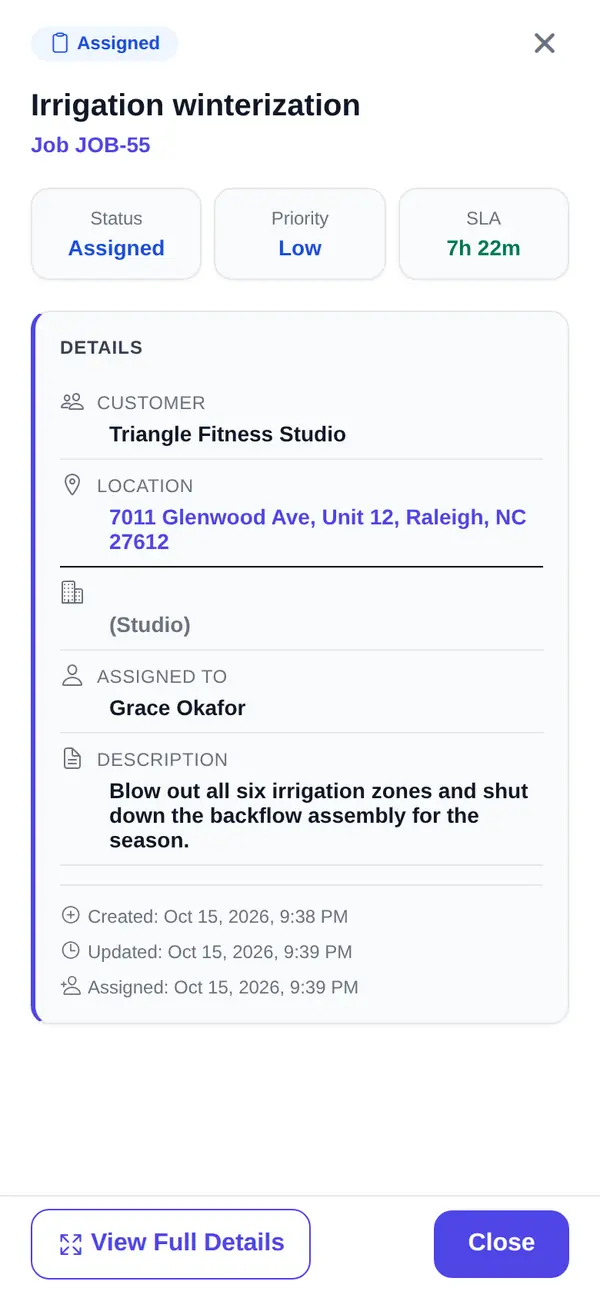
The two weeks that decide your year
It's the second week of October. The first hard freeze is forecast for Thursday night. You've got a few hundred blowouts on the list, three crews with compressors, and a phone that won't stop. Half the callers want to know when you're coming. A few are customers you started up in April and never heard from again, because nobody followed up.
Spring is the same fight in reverse. Every system in the service area wants to be turned on the same fortnight, and every broken head and leaky valve you find becomes a repair call you have to fit around the start-ups.
Irrigation business software earns its keep in those weeks. FSM Navigator is a field service management app, one app from first call to renewals. The season gets sold, scheduled, worked and billed in one place, so the fall list builds itself from the spring one.
Irrigation business software built around the season
Irrigation maintenance contracts that book their own visits
Most irrigation companies already sell some version of a seasonal plan: start-up in spring, a mid-season check, winterization in fall. The trouble is keeping it on paper or in somebody's head.
On Pro, service agreements are set up for the customer and the site, and they schedule their own visits. Name each agreement or plan whatever your customers call it: maintenance agreement, service contract or membership. The visits each agreement covers land on the schedule instead of on a clipboard. You get a renewal notice before an agreement ends, and membership plans paid by card can renew automatically when the customer agrees to it.
For a start-up in April and a winterization in October, set the agreement's visits to every six months, starting in April. Each agreement or location keeps one visit schedule, so both visits share that cadence.
Sign up free, then start a 14-day Pro or Enterprise trial from your account. A payment method is collected when the trial starts and isn't charged until the trial ends.
Membership plans with member pricing
Membership plans are agreements sold at a set price, with member pricing on repairs. Once your Stripe account is connected, customers can pay for them automatically by card. That's the customer who doesn't shop around in April because they're already yours. More on setting one up in how to start a maintenance membership program.
Recurring jobs for the work that isn't on contract
Some customers want a mid-season check every month and nothing more. On Pro, recurring jobs repeat on their own, daily, weekly, biweekly, monthly, quarterly or yearly, so the visit lands on the schedule without anyone retyping it. A weekly or biweekly schedule runs on one fixed weekday.
Backflow tests on the calendar, not in a drawer
Some water providers require an annual test on irrigation backflow assemblies. San Antonio Water System, for one, requires annual testing of backflow prevention assemblies, done by a licensed tester. If you offer the test, put it in the agreement or set it up as a yearly recurring job, and it comes back every year without a reminder card.
On Pro, you can record each technician's certifications with their expiry dates. Reminders go out 30 days ahead, 7 days ahead, on the day, and once more just after a certification lapses, so an expired one doesn't surprise you in the middle of testing season.
The day of the start-up, in the technician's hand
An app that works in the backyard
Native iOS and Android apps are on every plan, Free included. Technicians see their assigned visits, update status as they go (accepted, en route, arrived, in progress, complete) and add notes. The app is offline-first, so the tech in a basement with no signal keeps working, and changes sync when the phone reconnects.
Navigate, and GPS location for the office
Every plan includes technician GPS location, so the office can see where technicians are while they're on duty or on a job. Technicians tap Navigate to open the job address in their phone's maps app.
Checklists, photos and signatures
On Pro, technicians complete job forms and checklists in the app: pass or fail checks for every zone and head, readings with a unit, notes, choices and dates. They attach photos (up to 10 per job on Pro) of the cracked valve box or the backflow assembly before they touch it, and collect the customer's signature when the work is done. When a customer calls in May saying the start-up was skipped, you have the record. See job forms and signatures.
The board in peak season
Every plan includes a visual schedule board and calendar where you schedule and assign visits by hand. Status changes show on the board, which refreshes on its own through the day. That's enough for a two-truck shop working its service area street by street. See scheduling.
When the rush outgrows hand assignment, Pro adds intelligent dispatch. It evaluates availability, current workload, proximity and SLA urgency, and keeps rebalancing through the day as conditions change. On Enterprise, jobs can also carry required skill categories that dispatch takes into account. You can reassign anything by hand at any time.
Win the repair calls and the upgrades
Online booking that you approve
On Pro, customers pick a service and an arrival window on your online booking page and send a request. Every request waits for your approval before it goes on the schedule, so a homeowner can't book a blowout the day after your fall list closes. Here's whether online booking makes sense for your shop.
Good, better and best quotes for the upgrade
Spring start-ups turn up the bigger work: a controller swap, a new zone, a valve manifold that's had its day. On Pro, quotes are built from your pricebook with good, better and best options. The customer picks one and signs from their phone. If you take a deposit, it's issued as its own invoice that the customer pays online in your customer portal. Deposits are available once online payments are set up, and they're off while Stripe Tax collects your sales tax.
You turn the signed quote into a job in one step, and the invoice bills the option the customer picked at the price they signed.
Get paid before the ground freezes
Invoicing is on every plan, Free included (up to 100 invoices a month on Free). You invoice from the job. On Pro, there's no monthly invoice cap, and customers pay online by card or bank transfer (ACH) from the customer portal, settling to your own Stripe account. Stripe's processing fees and a platform fee apply; see pricing. The details are on invoicing and payments.
After a completed visit, customers are asked for a rating, on every plan. On Pro, customers who rate see your Google review link, and low ratings also alert your team, so you hear about the missed head before your neighbors do.
Free or Pro for an irrigation company
Here's the honest split. Free covers up to 5 users with the technician app, GPS location, Navigate, the schedule board, customer records and invoicing. It suits a shop that runs on one-off repair calls and keeps its seasonal list somewhere else.
Pro is where the irrigation year lives: service agreements and membership plans, recurring jobs, online booking, quotes, checklists and photos, intelligent dispatch and online payments. Pro is $34.99 per user per month, or $27.99 per user per month billed annually, with no user limit. Pricing is per user, and office staff who log in are users too.
What you get
- Agreements that book their own visits. Set a visit every six months starting in April and the start-up and winterization come back each year (Pro).
- Offline-first technician app. Keeps working without signal, on every plan.
- Navigate and GPS location. Open the job address in your maps app; see where techs are (every plan).
- Checklists, photos and signatures. Proof of every zone checked (Pro).
- Booking you approve. Customers request; you decide (Pro).
- Invoice from the job. On every plan; online payments on Pro.
Go deeper
Service agreements
Agreements that schedule their own visits, for the customer and the site.
Read moreMembership plans
Set-price plans with member pricing and automatic card payments.
Read moreScheduling
The board and calendar on every plan.
Read moreMobile app
The offline-first app your techs carry.
Read moreService agreement renewals
What keeps customers on the plan year after year.
Read the articleRelated trades
Common questions about irrigation business software
What does irrigation business software do?
It keeps the irrigation and sprinkler service year in one place: customer records and locations, the schedule board, the technician app and invoicing. In FSM Navigator, those are on every plan, Free included. On Pro you add service agreements that schedule their own visits, recurring jobs, online booking, good, better and best quotes, job checklists and photos, and online payments by card or bank transfer.
Can I schedule spring start-ups and fall winterizations in advance?
Yes, on Pro. Set the customer up on a service agreement and it schedules its own visits, so the visits it covers land on the schedule without anyone retyping them. For a start-up in April and a winterization in October, set the visits to every six months, starting in April. For customers who aren't on an agreement, recurring jobs repeat on their own. You can still move or reassign any visit by hand on the schedule board.
How do I manage irrigation maintenance contracts?
On Pro, irrigation maintenance contracts live in FSM Navigator as service agreements for the customer and the site. They schedule their own visits. You name each agreement or plan yourself: maintenance agreement, service contract or membership. Membership plans can carry member pricing on repairs, and customers can pay automatically by card once your Stripe account is connected. You get a renewal notice before an agreement ends, and membership plans paid by card can renew automatically when the customer agrees to it.
Does the technician app work without cell signal?
Yes. The iOS and Android apps are offline-first and included on every plan, Free included. A technician in a basement or a rural backyard keeps updating status and adding notes, and changes sync automatically when the phone reconnects. On Pro, technicians also complete checklists, attach photos and collect the customer's signature in the same app.
How do technicians get to the next job?
Technicians tap Navigate to open the job address in their phone's maps app, on every plan. FSM Navigator doesn't plan the day's drives itself. The office sees where technicians are on duty on every plan, and on Pro intelligent dispatch weighs proximity along with workload and availability when it assigns the next visit.
Can customers book irrigation service online?
Yes, on Pro. Customers pick a service and an arrival window on your booking page and send a request. Every request waits for your approval before it goes on the schedule, so you stay in control of the calendar during the start-up and blowout rush. Once approved, the visit appears on the board like any other.
How much does irrigation service software cost?
FSM Navigator has a Free plan for up to 5 users, and signing up for it needs no card. Pro is $34.99 per user per month, or $27.99 per user per month billed annually, and Enterprise is $59.99 per user per month, or $47.99 billed annually. Paid plans have no user limit and a 14-day free trial; a card is required to start the trial and isn't charged until it ends. A platform fee applies to online payments; see the pricing page.
Get this spring's start-ups on the board.
The technician app, GPS location, Navigate, the schedule board and invoicing are on every plan, Free included. Add your techs and run your next start-up from the phone.